← Back to Portfolio
ServiceNow ITSM Incident Problem Change Governance UI Policies Assignment

ServiceNow ITSM Implementation Lab

Built an end-to-end ITSM implementation in a ServiceNow Developer instance using native configuration. The lab focuses on governance, consistent data capture, controlled lifecycle transitions, and realistic operational routing across Incident, Problem, and Change Management.

20
Core Config Steps
Major build milestones documented
0
Custom Scripts
Configured with native features
5
Workflow Phases
Build from foundation to governance
3
ITSM Modules
Incident, Problem, Change
P1–P2
Emergency Control
Priority gated emergency workflow
Consistent incident intake and lifecycle Assignment rules and routing discipline Change governance with schedules and risk

Project overview

This lab simulates an ITSM implementation you would build during platform onboarding or process modernization. Instead of isolated features, the focus is on how pieces work together: structured forms, clean classification, predictable state changes, disciplined routing, and governance that prevents bad changes from slipping into production.

The implementation intentionally avoids custom scripting so the configuration mirrors how many regulated teams operate: using dictionary settings, UI policies, assignment rules, notifications, maintenance schedules, blackout windows, and controlled UI actions.
Key deliverables

  • Incident form redesign with standard fields, categories, and lifecycle enforcement
  • Conditional mandatory behavior via UI policies and dictionary controls
  • Assignment rules that route tickets using category, CI, and priority context
  • Problem records aligned to incident trends and governance-focused ownership
  • Change governance: risk logic, maintenance windows, blackout periods, and emergency gating

Workflow Overview

Phase 1

Incident foundation

Standardize the incident intake process by configuring form layout, categories, subcategories, and state flow to ensure consistent triage, documentation, and closure.

Phase 2

Automation and assignment

Implement assignment rules and conditional logic to route incidents automatically and enforce required fields based on priority and lifecycle stage.

Phase 3

Problem control

Establish structured problem records to link recurring incidents, assign ownership, document root cause analysis, and track long-term resolution efforts.

Phase 4

Change governance

Enforce controlled change execution through standardized forms, mandatory planning fields, risk assessment logic, and scheduling constraints.

Phase 5

Emergency control

Restrict emergency change creation using priority-based UI actions to prevent misuse while preserving rapid response for critical incidents.

Lab Breakdown

Phase 1 — Incident Management Foundation

This phase establishes a predictable, governable incident lifecycle. The focus is on removing noisy defaults, enforcing consistent classification, and ensuring incidents move through defined states without bypassing required documentation or controls.

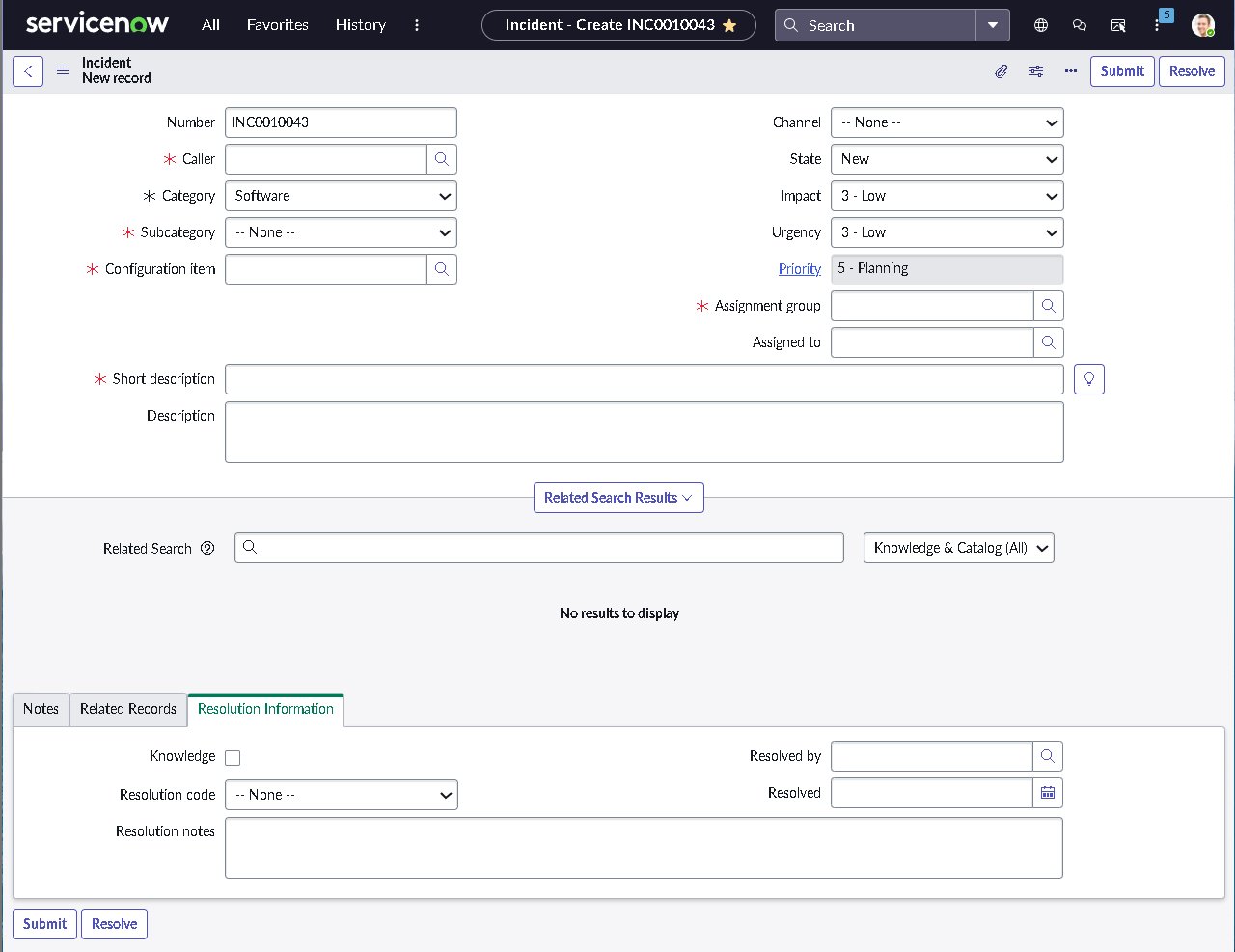
1.1 — Incident Form Layout and Field Standardization

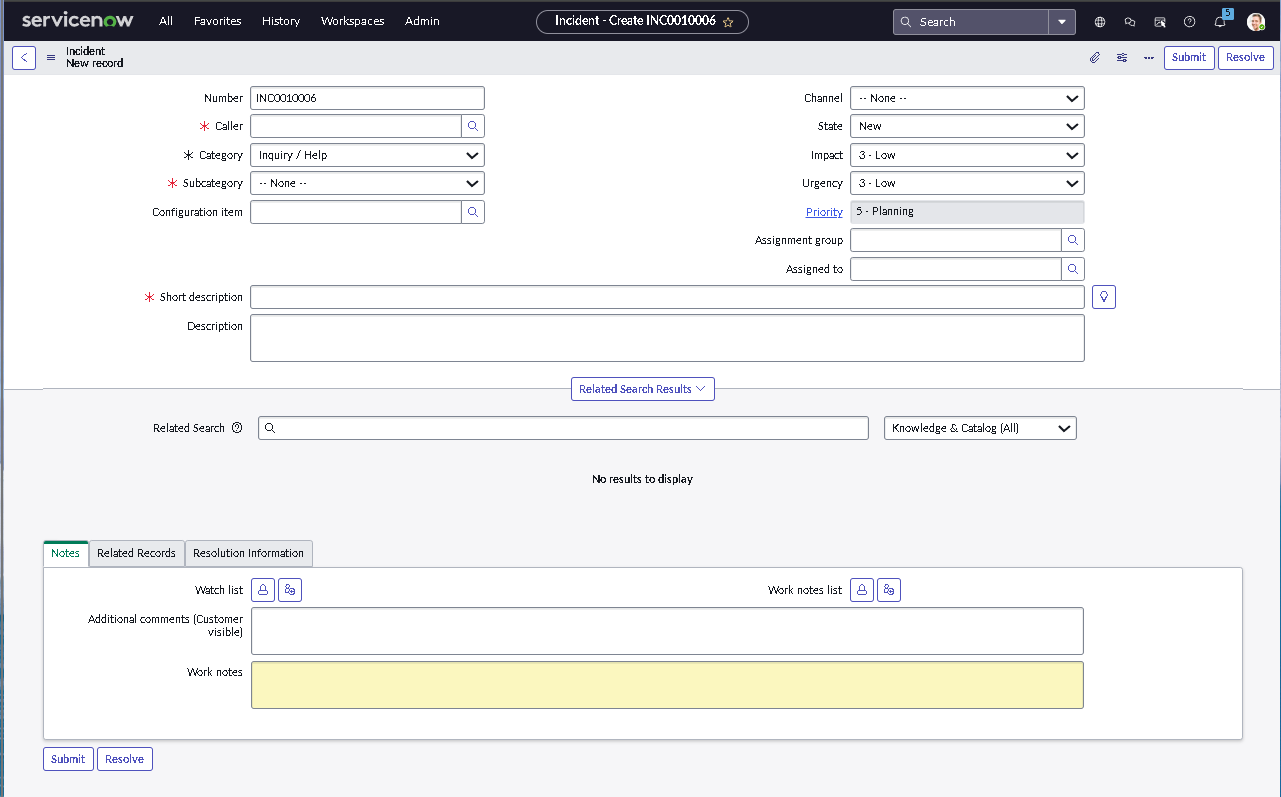
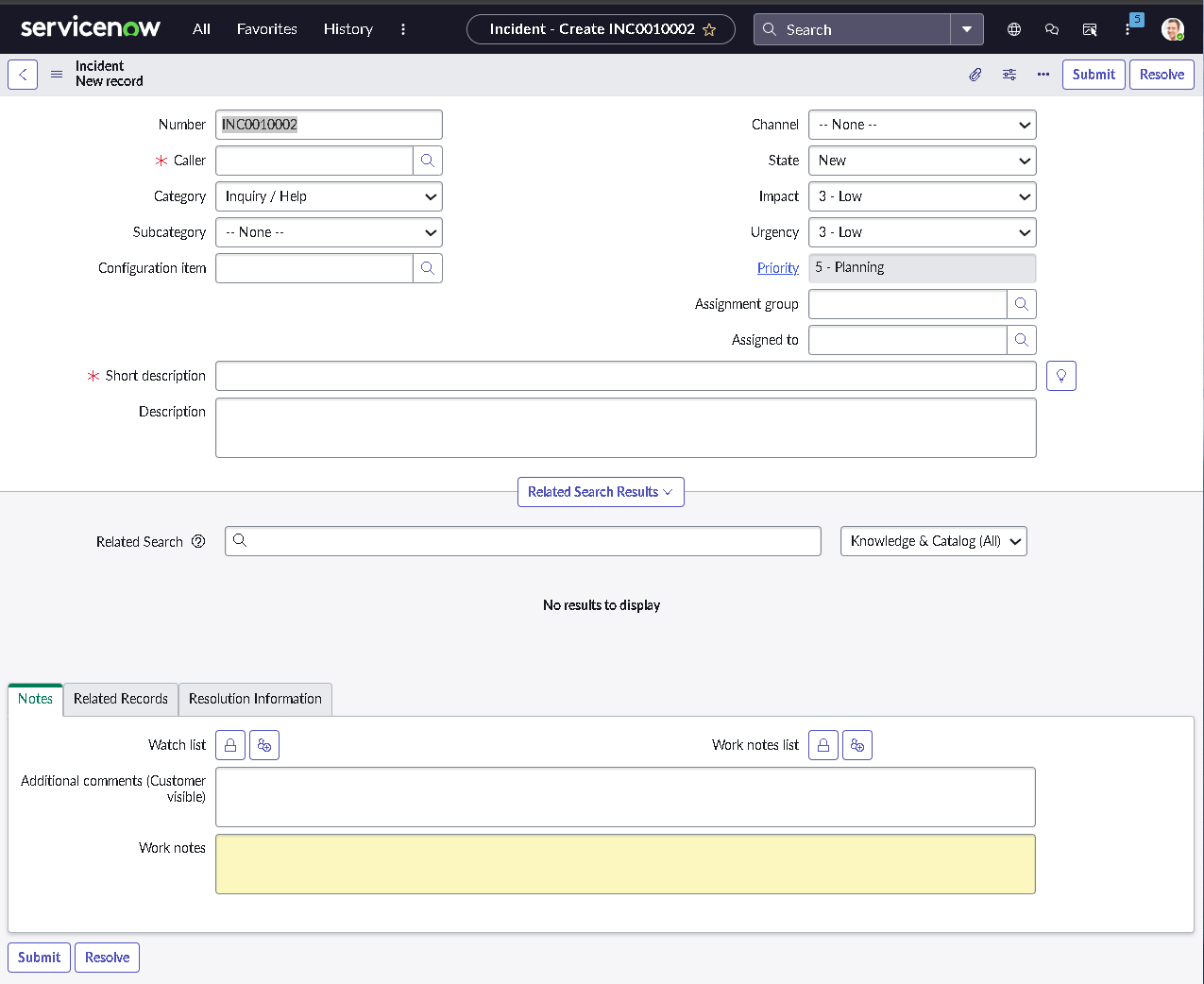
The incident form was redesigned from a Tier 1 analyst perspective to ensure essential triage information is captured immediately. Nonessential fields were removed or deprioritized to reduce clutter and inconsistent data entry.

  • Promoted core triage fields above the fold
  • Removed unused or low-value default fields
  • Aligned field order to real service desk intake flow
  • Preserved native behaviors such as caller lookup
Streamlined incident form

Streamlined incident form for clean intake and faster triage.

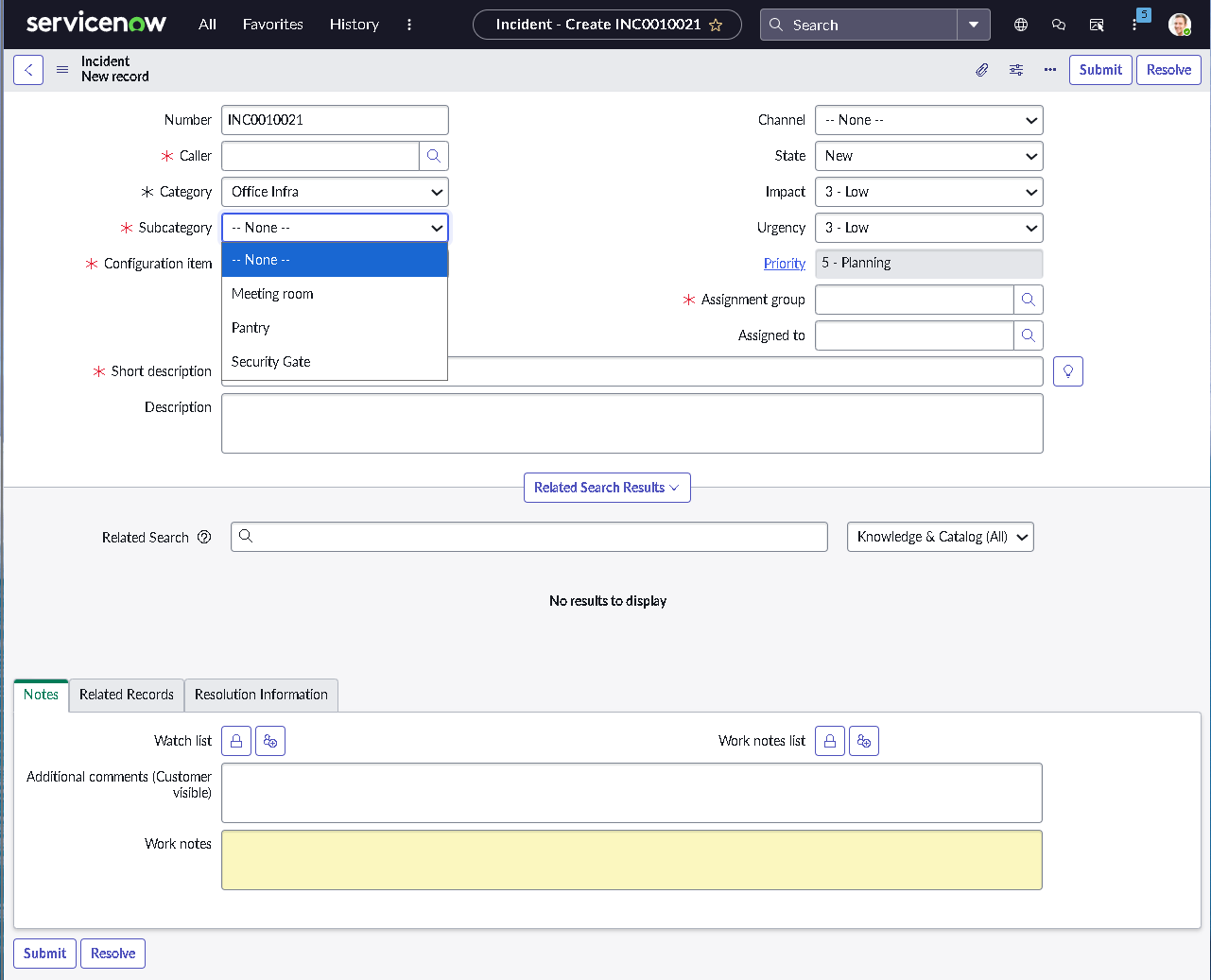
1.2 — Category and Subcategory Taxonomy

A structured category and subcategory taxonomy was defined to eliminate ambiguous classification and enable reliable reporting, routing, and downstream automation.

  • Defined categories aligned to common IT support domains
  • Mapped subcategories to prevent free-text workarounds
  • Validated dynamic subcategory filtering and reporting views
Category and subcategory dependency

Category selection controls the available subcategories for consistent classification.

1.3 — Mandatory Fields and Lifecycle Enforcement

Mandatory field enforcement was applied at appropriate lifecycle stages to prevent premature resolution or closure without required context, while avoiding unnecessary friction during incident creation.

  • Applied conditional mandatory logic using UI policies
  • Enforced resolution documentation before state changes
  • Used dictionary controls for global enforcement where needed
Mandatory fields enforced on incident form

UI policy enforcement in the form view, requiring key data before progression.

1.4 — State Model Validation and Controlled Transitions

Incident state transitions were validated to ensure tickets follow a controlled path from creation through resolution and closure, preventing skipped governance and metric manipulation.

  • Validated New → In Progress → Resolved → Closed flow
  • Blocked direct closure without resolution documentation
  • Tested reopen paths to preserve audit and SLA integrity
State choice restriction via dictionary entry

Dictionary-driven restriction of state choices to prevent invalid transitions.

1.5 — Backend UI Policy Configuration Validation

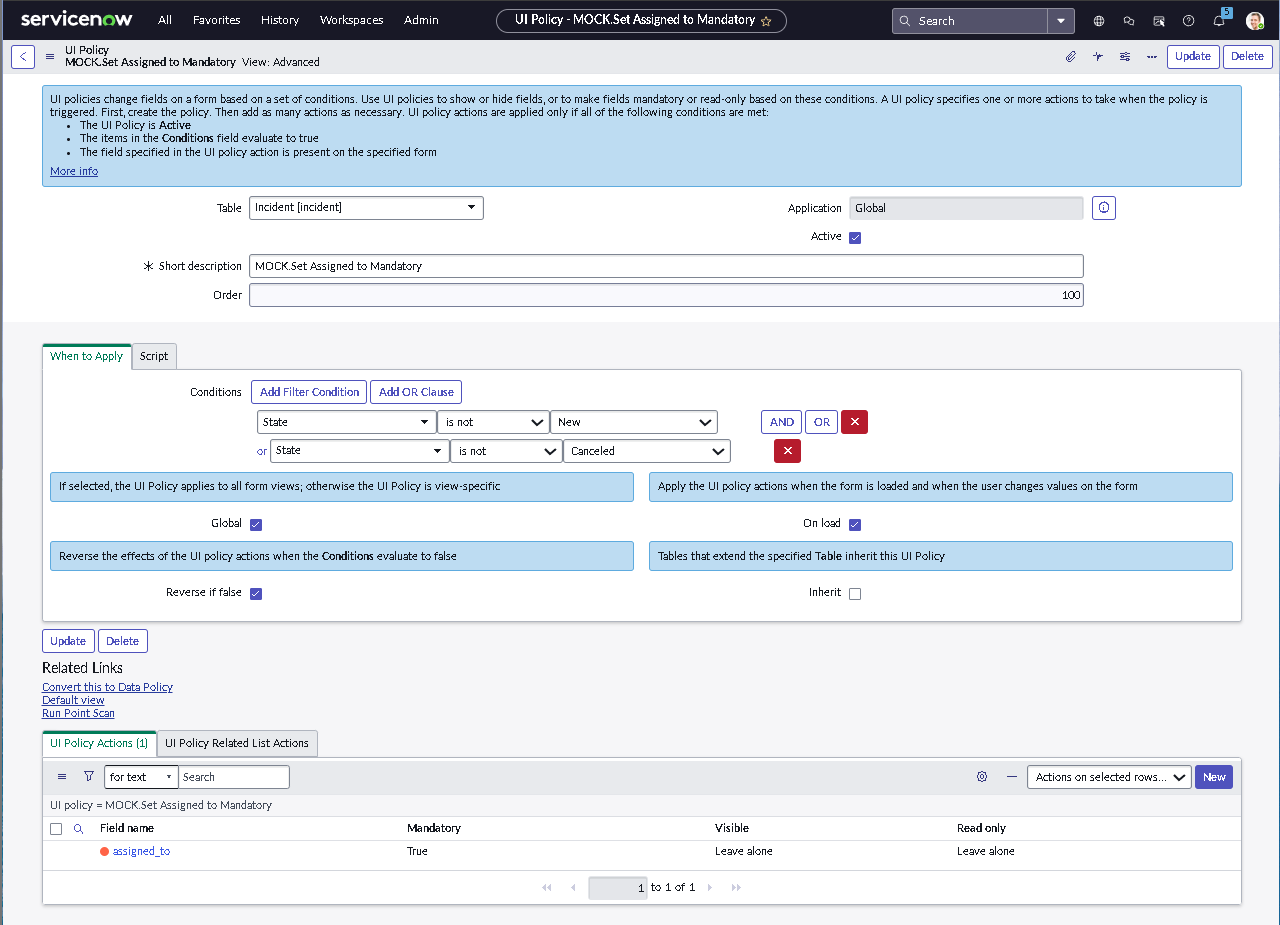
This step validates that mandatory enforcement is intentional rather than accidental. The UI policy is configured at the platform level so behavior remains repeatable, auditable, and maintainable over time.

  • Verified condition logic aligns with the intended lifecycle stage
  • Confirmed field-level mandatory settings are applied by policy
  • Ensured consistent behavior across form and related UI contexts
UI Policy backend configuration

Backend UI policy configuration ensuring mandatory behavior integrity.

1.6 — SLA definition for response and resolution tracking

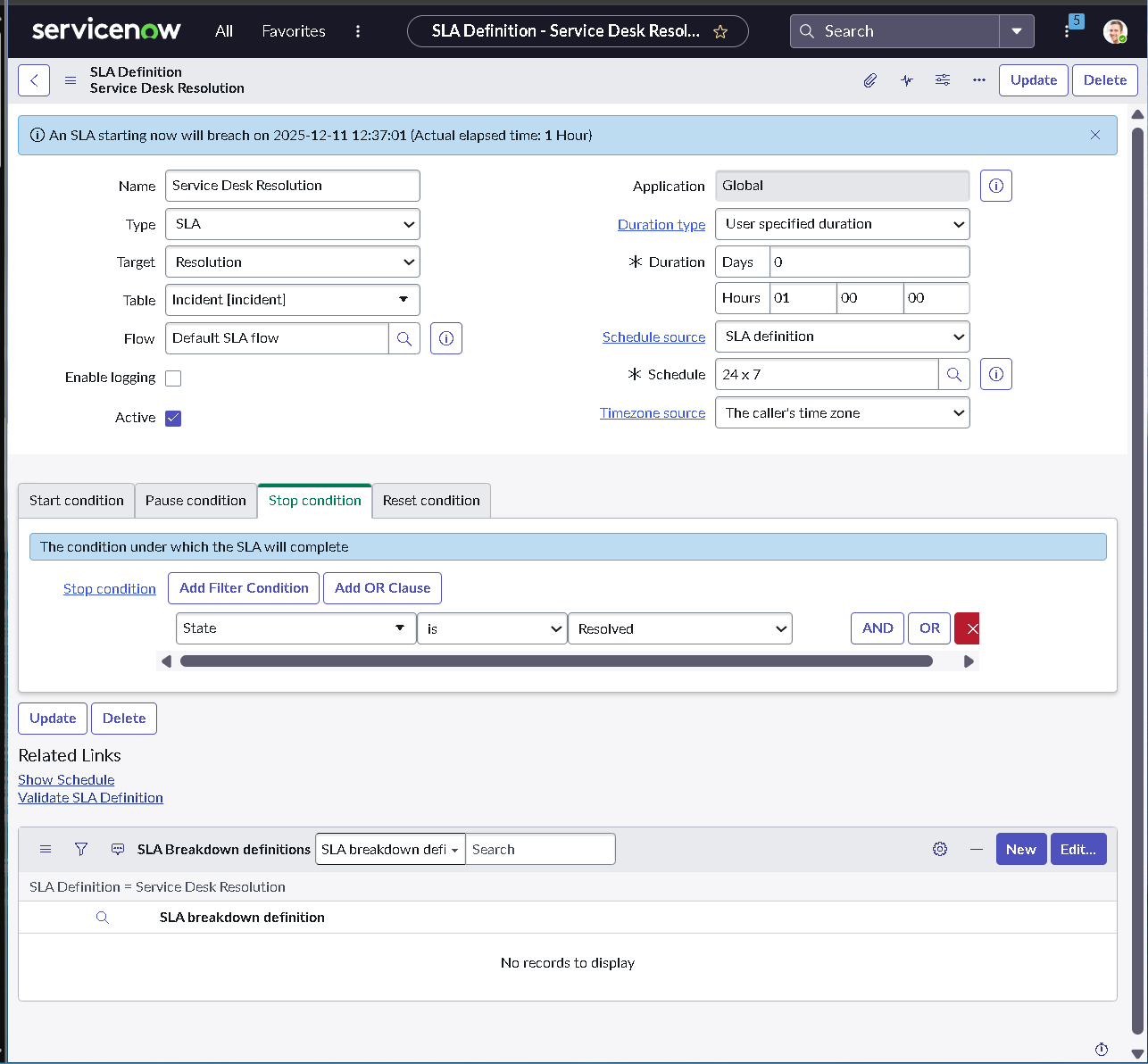
Response and resolution expectations were formalized using SLAs to ensure the service desk is measured against consistent time-based commitments rather than informal or ad-hoc escalation.

  • Defined SLA targets tied to incident priority and lifecycle stage
  • Validated start and stop conditions to prevent false timing
  • Ensured resolution measurement supports operational and performance reporting
SLA definition configuration

SLA definition showing response and resolution timer configuration.

1.7 — SLA results proven on a resolved incident

This step verifies that SLA configuration is actively enforced on real records. The incident timeline demonstrates tracked SLA progress across the full lifecycle from creation through resolution.

  • Confirmed SLA timers display directly on the incident record
  • Validated correct pause and stop behavior during state transitions
  • Verified evidence quality supports audit and operational reporting
SLA results on resolved incident

SLA timeline visible on the incident record, proving end-to-end tracking.

Phase 2 — Automation and Assignment Discipline

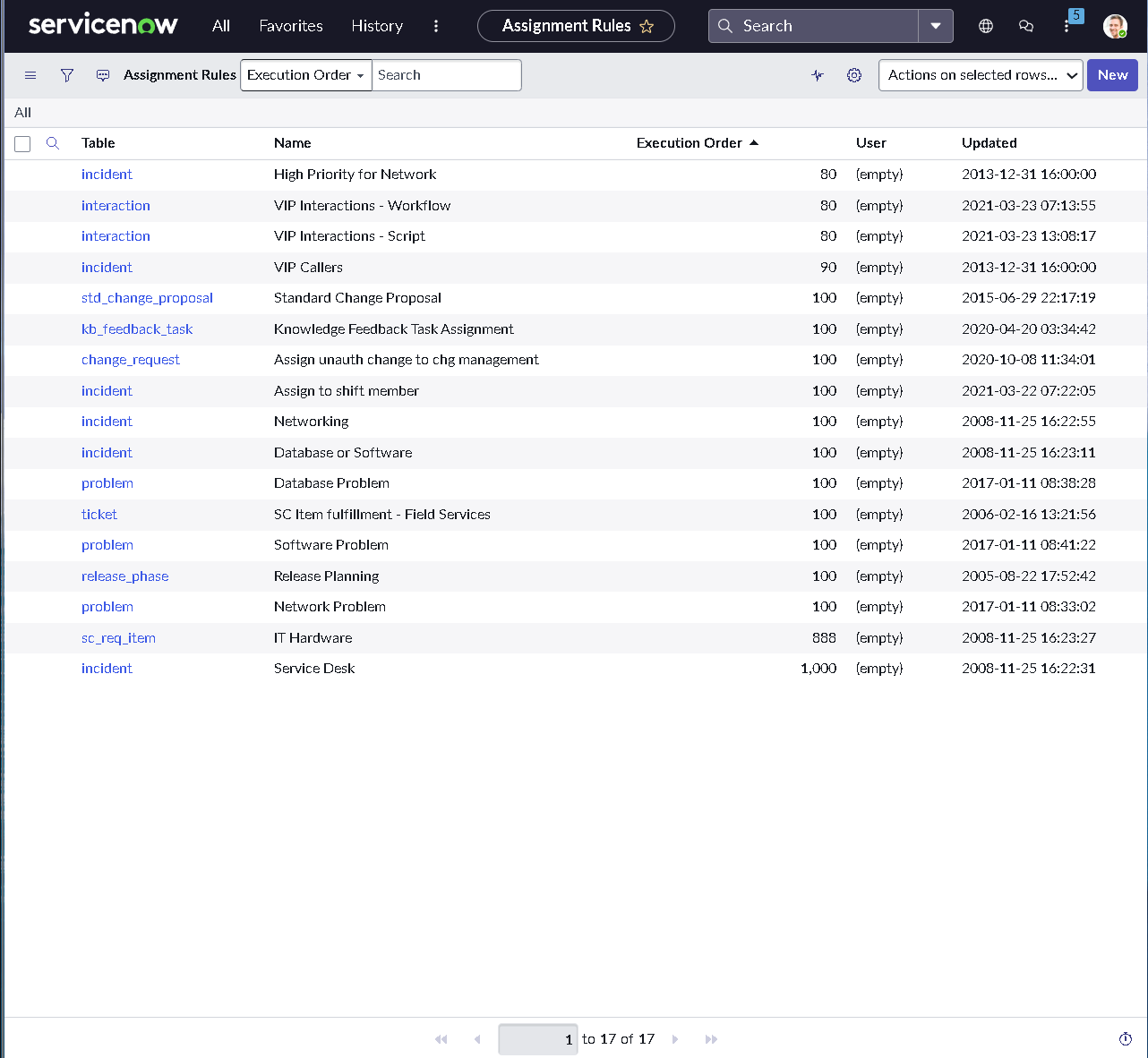
This phase focuses on ensuring incidents reach the correct team quickly and predictably. Assignment behavior is driven by structured data rather than manual decisions, making routing auditable, repeatable, and aligned with service ownership.

2.1 — Assignment Group Strategy and Ownership Model

Before automation was introduced, assignment behavior was designed around clear ownership boundaries. Routing logic must be deterministic so reassignment loops do not become the default operating mode.

  • Designed routing logic to minimize overlap and ownership ambiguity
  • Aligned rule priority to mirror real-world support triage
  • Validated predictable outcomes using a consistent rule execution order
  • Ensured routing inputs are captured reliably during incident intake
Assignment rules execution order

Execution order view showing rule priority and deterministic evaluation behavior.

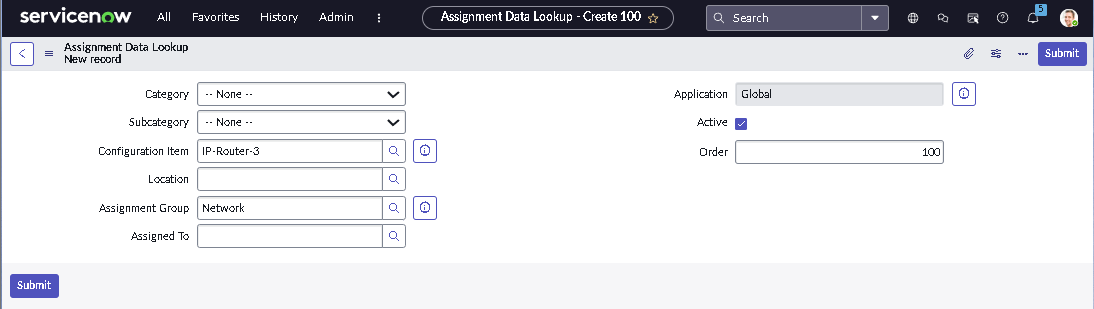
2.2 — Assignment Rules for Category and CI Driven Routing

Assignment logic was implemented so routing is driven by structured classification rather than manual dispatch. Category and subcategory serve as the primary routing inputs for consistent ownership decisions.

  • Mapped classification to ownership using lookup-based routing logic
  • Reduced conditional complexity through an assignment data lookup approach
  • Improved auditability and transparency of routing decisions
  • Validated consistent routing across multiple test incidents
Assignment data lookup record

Category to assignment group mapping using assignment data lookup.

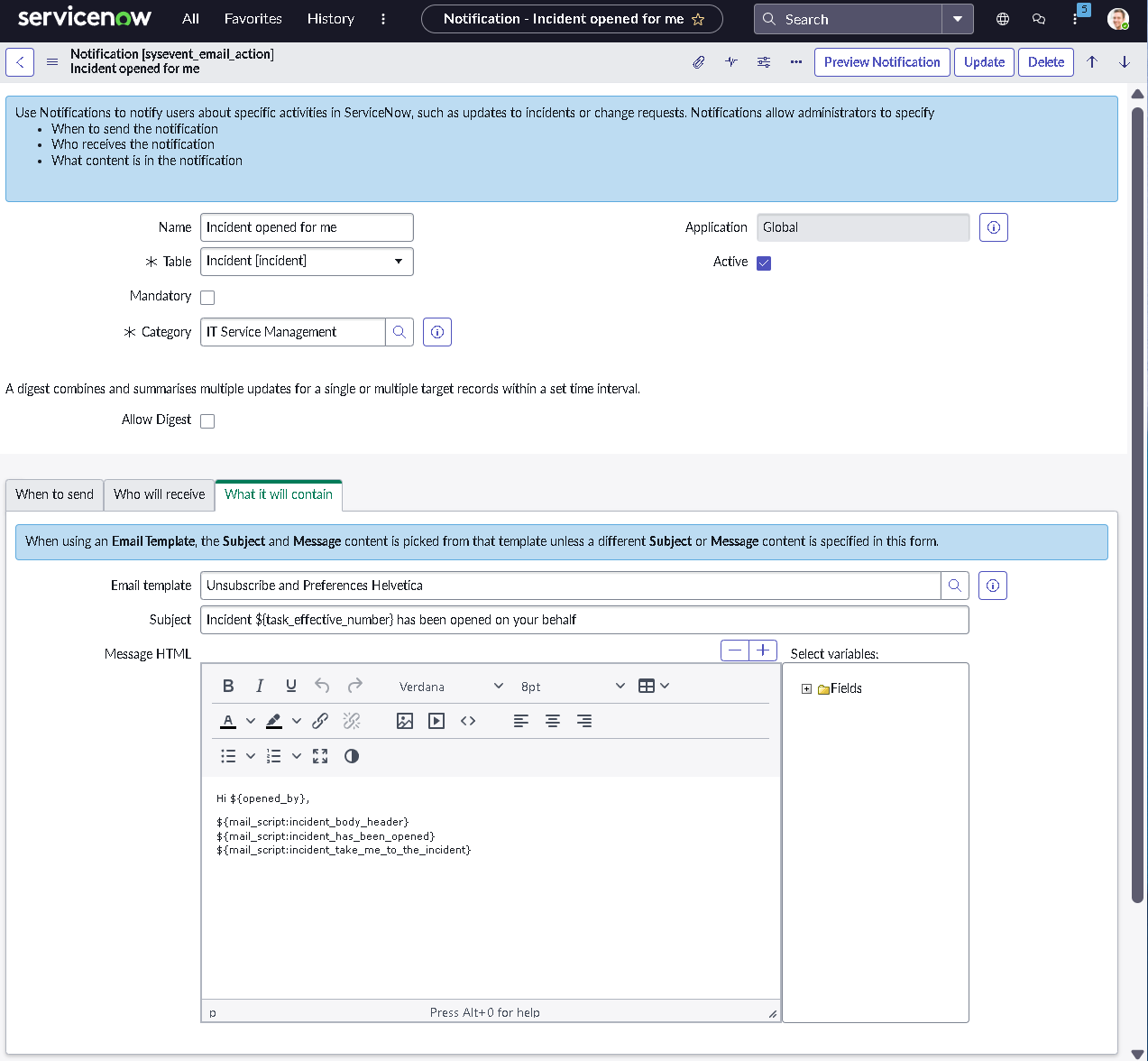
2.3 — Notification Triggers and Delivery Control

Notification logic was aligned to meaningful lifecycle events so teams are alerted only when action is required. Triggers are tied to ownership changes, priority escalation, resolution, and reopen behavior while minimizing unnecessary noise.

  • Validated notification triggers against real workflow events
  • Confirmed recipients align with assignment group ownership
  • Removed overlapping or duplicate notification conditions
  • Tested delivery behavior across classic and modern UI experiences
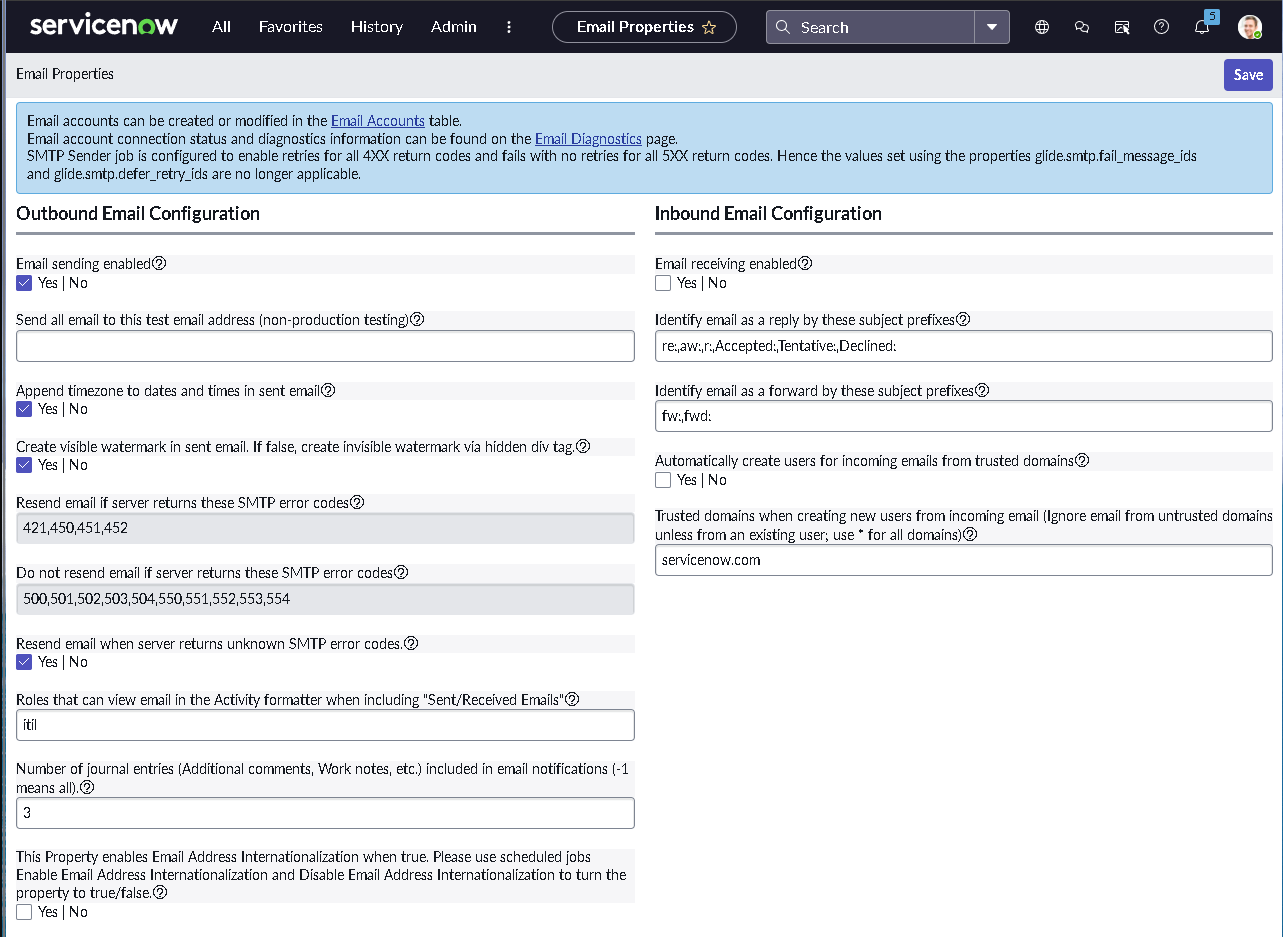
Notification configuration view

Backend notification setup aligned to lifecycle events and ownership.

2.4 — Email Output Validation for End User Experience

After notification logic was configured, the HTML email output was validated to confirm readability, context, and usefulness. This ensures the user-facing experience matches the intended design and operational intent.

  • Verified subject and body include actionable incident context
  • Confirmed formatting is readable, consistent, and scannable
  • Reduced noise by focusing content on ownership, status, and next steps
Email preview for incident notification

Email preview showing what the user sees when the notification triggers.

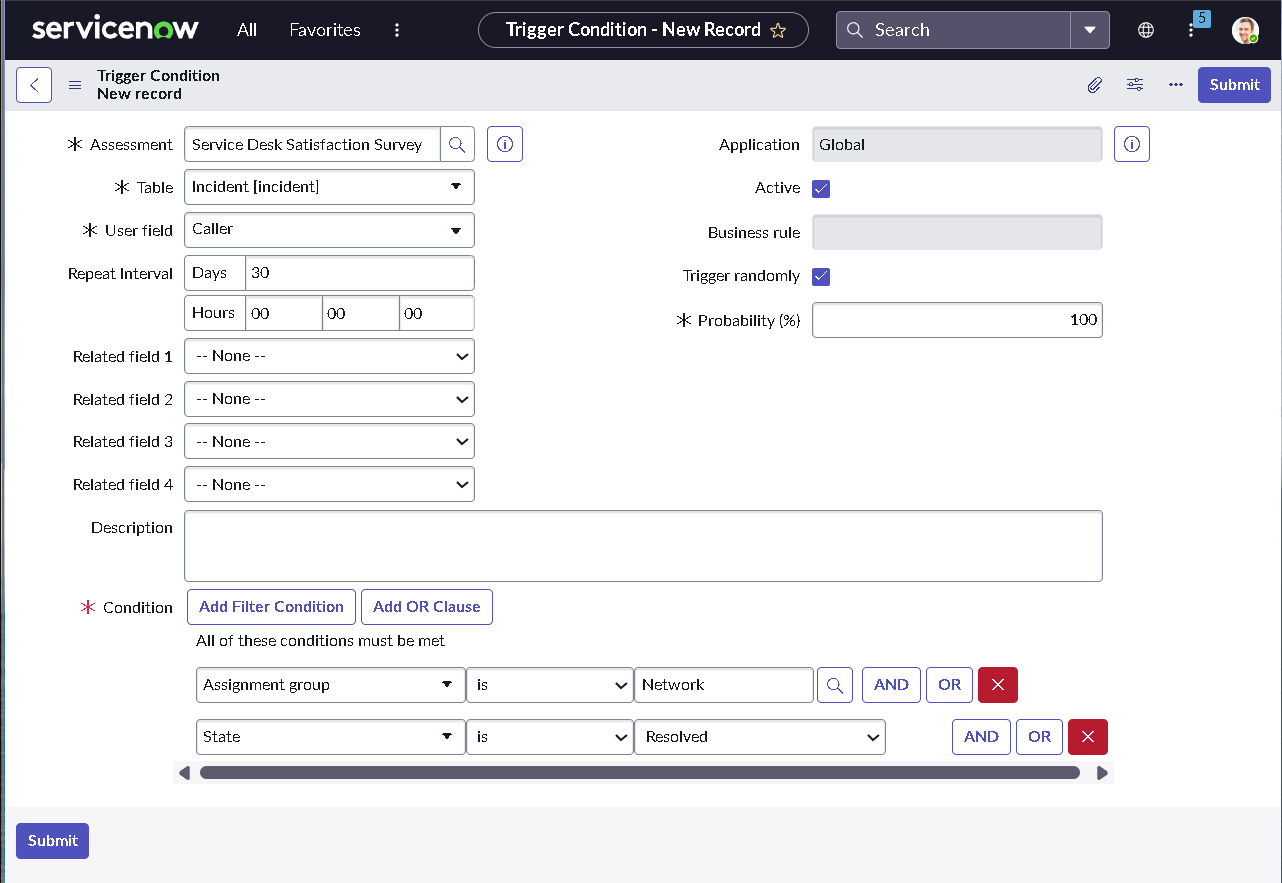
2.5 — Survey Automation for Service Quality Measurement

CSAT surveys were triggered automatically after incident resolution to measure service quality. This establishes a structured feedback loop that supports continuous improvement and operational accountability.

  • Configured trigger conditions to fire on the correct lifecycle event
  • Reduced false sends by targeting only valid resolved outcomes
  • Established a measurable service desk feedback signal
Survey trigger condition configuration

Trigger condition configuration for automatically sending CSAT surveys.

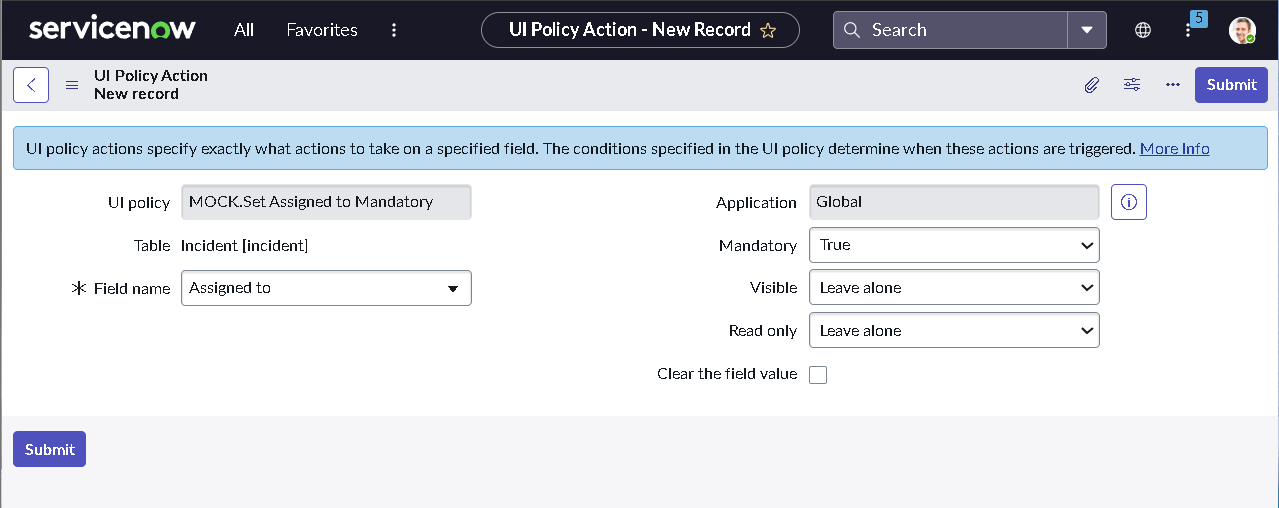
2.6 — UI Policy Actions for Dynamic Field Visibility and Control

UI Policy Actions were used to dynamically show, hide, or require fields based on context. This keeps the form clean while still enforcing governance only when it matters.

  • Reduced clutter by hiding fields until the appropriate context appears
  • Enforced required data only when the lifecycle stage demands it
  • Improved analyst efficiency without sacrificing data integrity
UI Policy Action configuration

UI policy action configuration for visibility and mandatory logic control.

Phase 3 — Problem Management Control and Ownership

This phase establishes Problem Management as the mechanism for eliminating recurring incidents. The focus is on ownership, investigation discipline, and traceability between incidents, root cause, and permanent corrective actions.

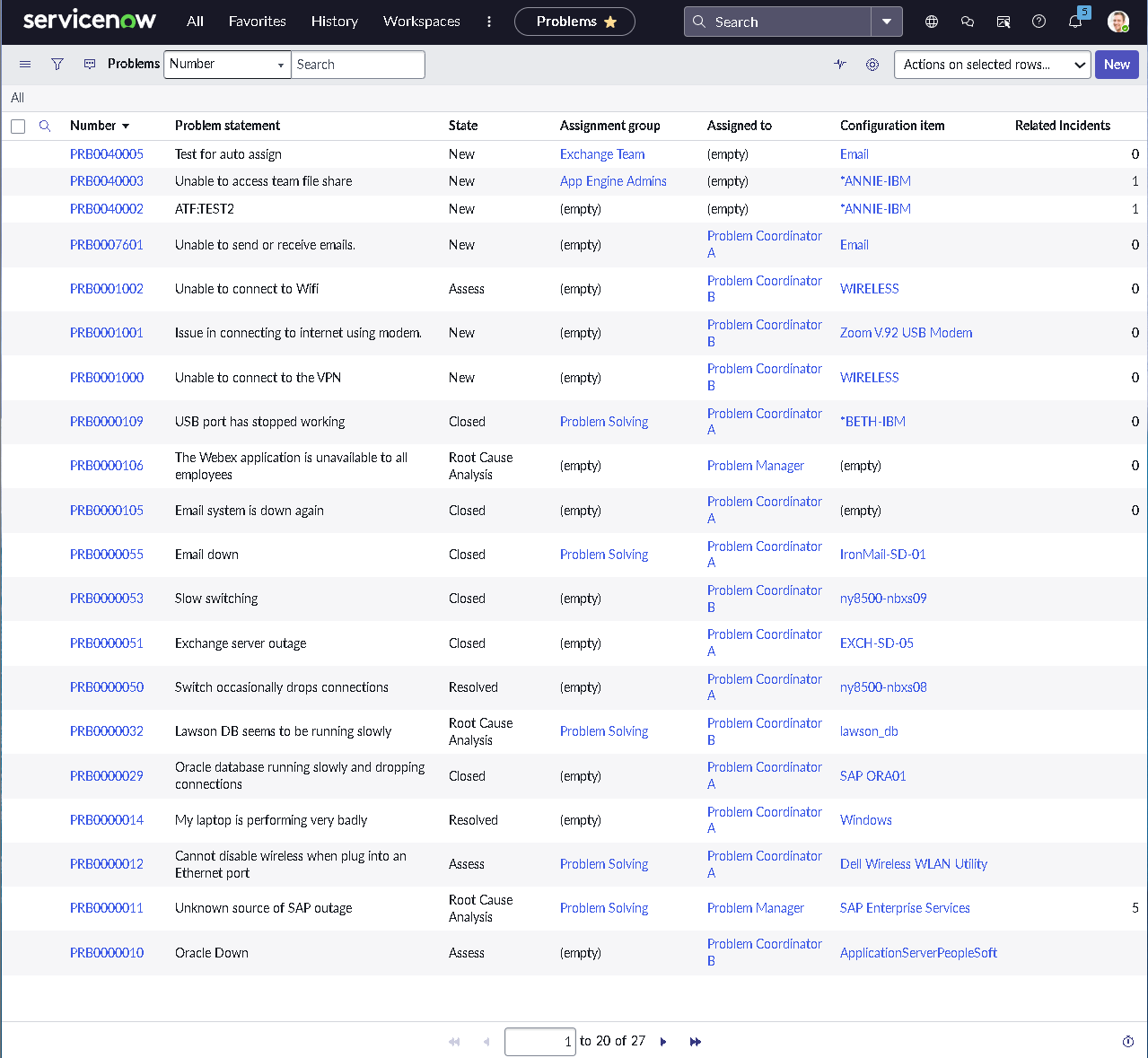
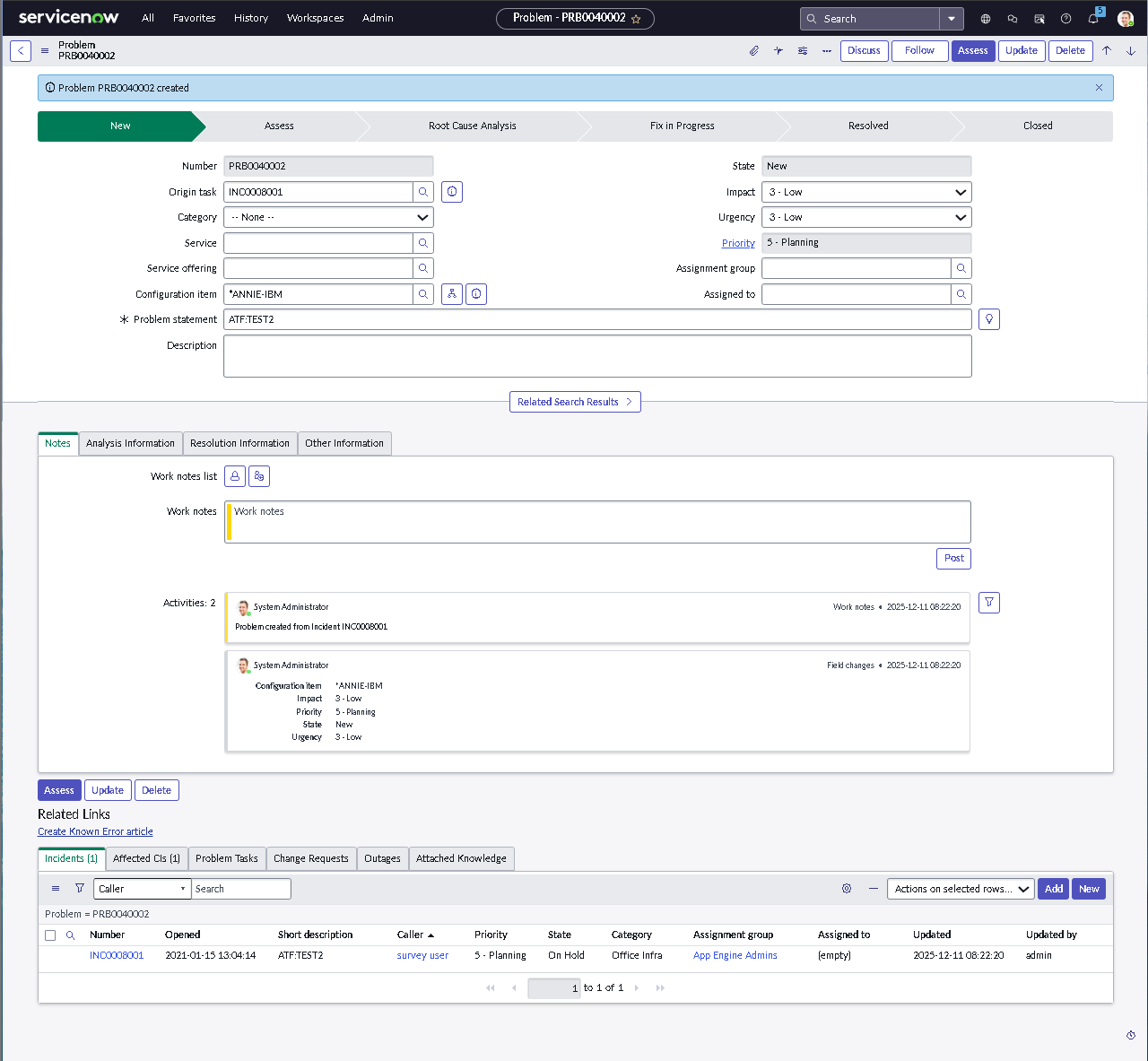
3.1 — Problem Record Structure and Incident Linkage

Problem records were reviewed and validated to ensure they support investigation rather than short-term resolution. Incidents can be linked to a single problem to expose patterns, centralize ownership, and prevent repeated ticket firefighting.

  • Validated incident-to-problem linking and related lists
  • Ensured ownership fields support investigation accountability
  • Confirmed lifecycle states reflect investigation and remediation progress
  • Tested that linked incidents retain full context and visibility
Problem record created from incident

Problem record created from an incident to preserve context and linkage.

3.2 — Investigation Governance and Controlled Lifecycle Progression

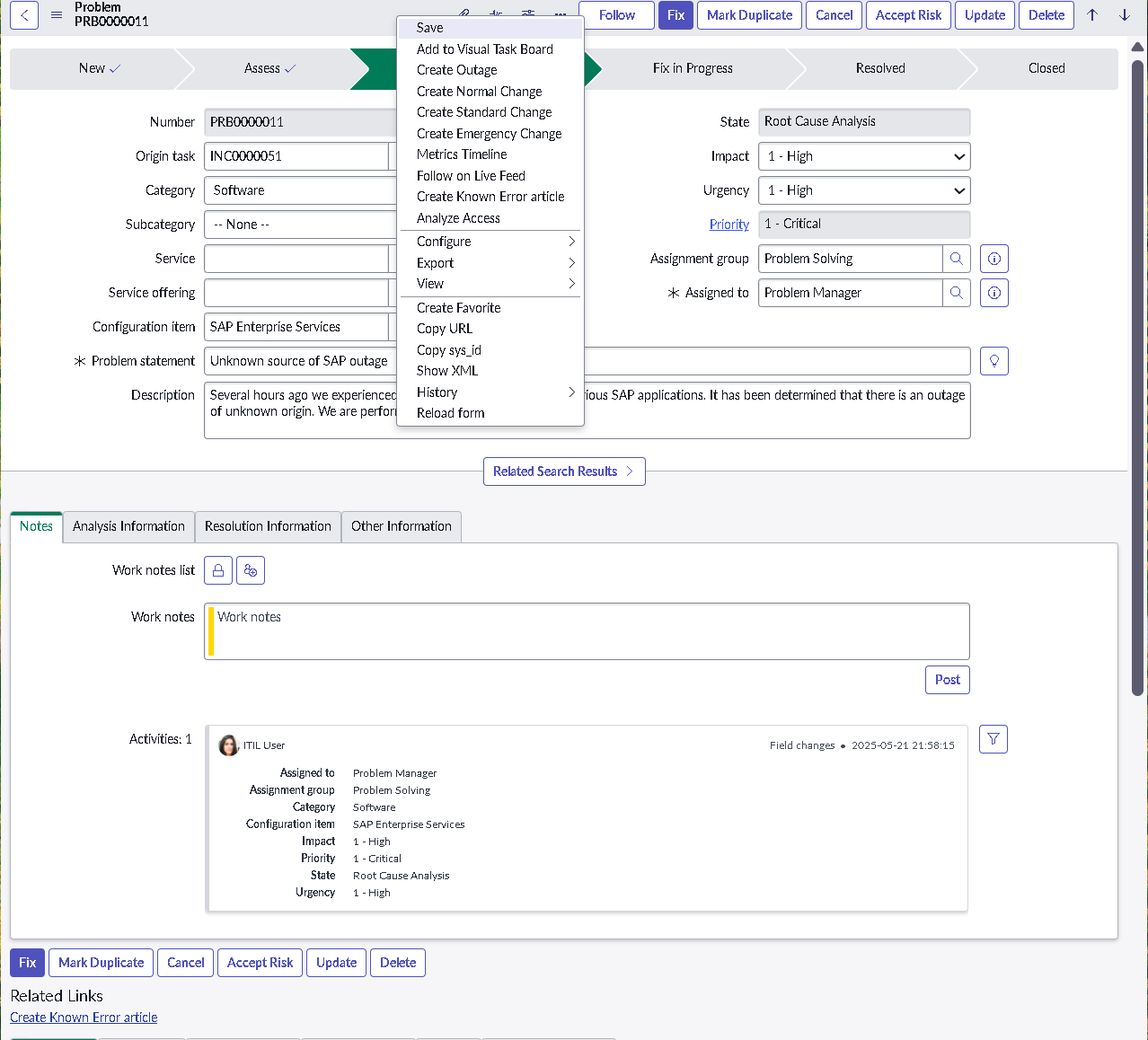
Governance controls were applied to ensure problems cannot progress without meaningful analysis. Investigation fields become mandatory at key lifecycle stages, preventing premature closure and ensuring root cause information is captured consistently.

  • Enforced investigation fields before lifecycle state transitions
  • Used UI policies for conditional enforcement without scripting
  • Aligned problem states to realistic root cause analysis workflows
  • Required resolution detail before problem closure
Root cause analysis fields enforced

High priority problem records enforce root cause analysis fields before progression.

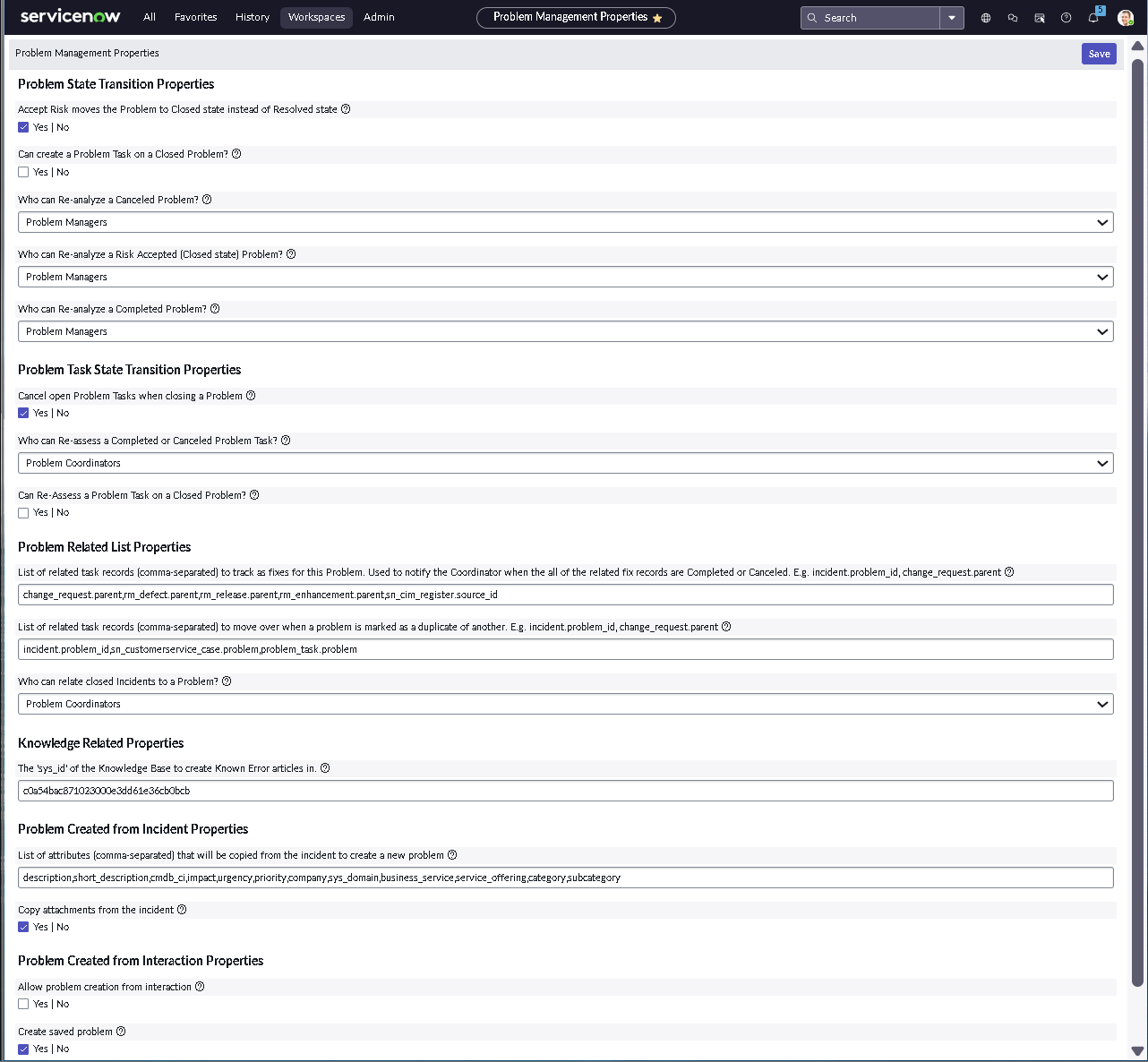
3.3 — Module Properties Controlling Investigation Behavior

Problem Management module properties were reviewed and configured to support governance expectations such as investigation discipline, analysis behavior, and consistent lifecycle enforcement across the module.

  • Validated module-level configuration for consistent investigation behavior
  • Reduced reliance on individual user judgment through enforced properties
  • Improved consistency and predictability across problem records
Problem management properties configuration

Problem Management properties configuration supporting governance and analysis rules.

3.4 — Workflow Validation with State Transition Testing

Workflow testing was used to verify that state transitions and ownership behavior occur exactly as designed. This prevents silent drift between documented process and actual platform behavior.

  • Confirmed predictable state movement under controlled test conditions
  • Validated ownership and assignment behavior during lifecycle changes
  • Proved automation outcomes using visible, repeatable evidence
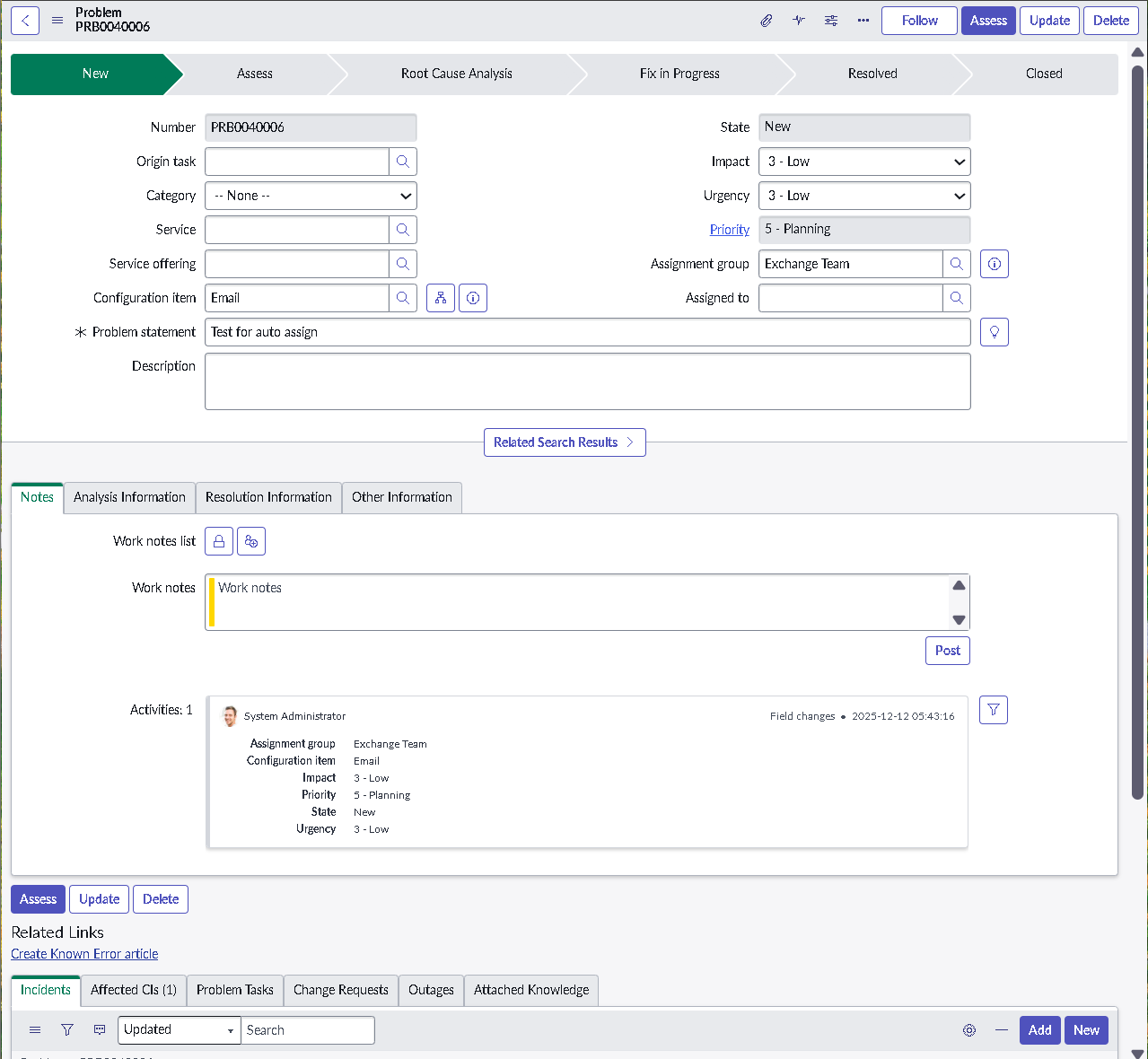
Problem workflow state auto assignment test

Workflow test proving state transition logic and automatic assignment behavior.

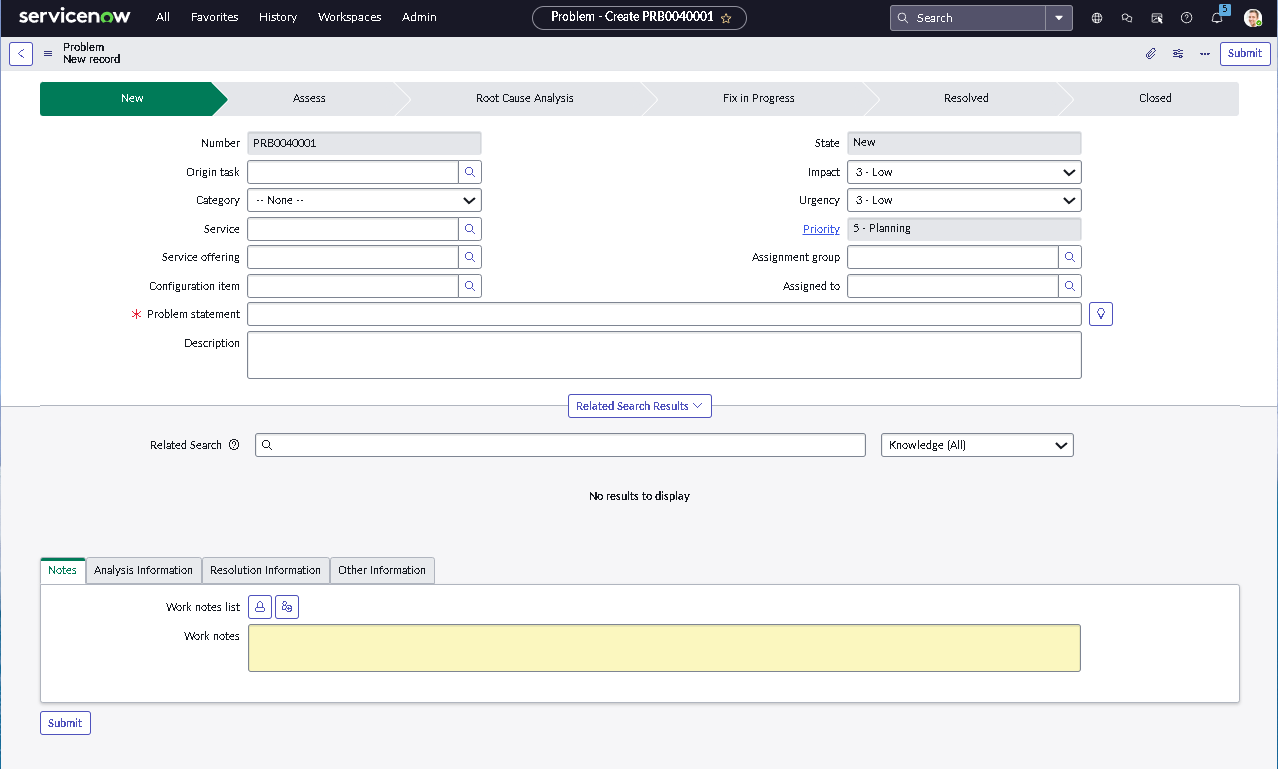
3.5 — Default Problem Form Shows Investigative Layout Differences

The Problem form is intentionally designed to differ from the incident intake experience. This supports investigation workflows and long-term corrective actions rather than rapid triage.

  • Validated investigative fields are surfaced appropriately by default
  • Reinforced that different record types require distinct layouts
  • Improved analyst clarity and intent across modules
Default problem form view

Default Problem form view illustrating investigative structure and field layout.

Phase 4 — Change Management Governance, Risk, and Scheduling Control

This phase establishes disciplined change governance by enforcing planning completeness, risk-driven approvals, and controlled scheduling. The objective is to prevent unplanned or unsafe production changes through platform-enforced guardrails.

4.1 — Change Form Structure and Planning Enforcement

Change request forms were redesigned to reflect real governance expectations. Planning fields such as implementation steps, testing evidence, impact assessment, and backout plans are structured so the change record itself demonstrates readiness for execution and review.

  • Organized planning fields to support efficient CAB-style review
  • Required backout and test plans before change submission
  • Aligned form layout with real-world change execution workflows
  • Validated form behavior across platform UI states
Change planning fields

Planning tab fields showing rollback and test plan governance requirements.

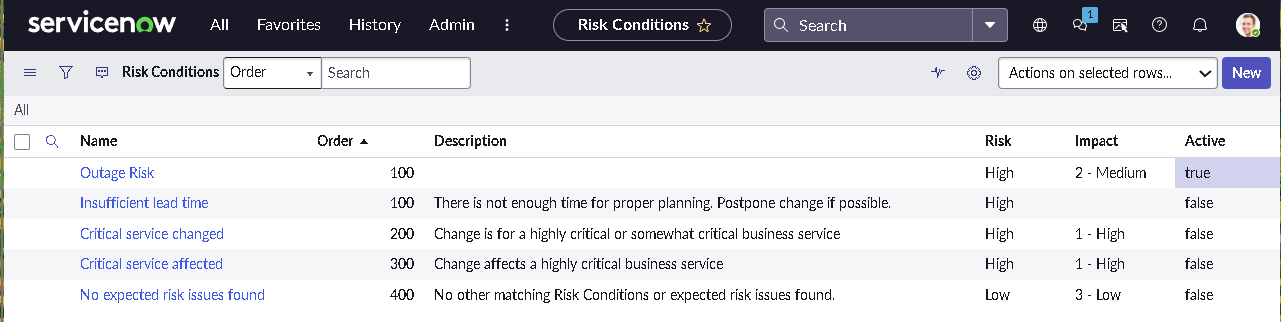
4.2 — Risk Calculation and Approval Driven Governance

Risk logic was configured to translate change attributes into actionable governance signals. Risk levels update dynamically based on impact, urgency, CI context, and planning quality, guiding approval requirements without manual interpretation.

  • Mapped change attributes to defined risk levels
  • Validated real-time risk recalculation as planning fields change
  • Surfaced high-risk changes clearly for reviewer and approver attention
  • Tested approval experience against multiple risk outcomes
Risk condition rules list

Risk condition rules driving risk level based on outage potential and CI criticality.

4.3 — Maintenance Windows and Blackout Scheduling Controls

Scheduling controls were implemented to enforce when changes may safely occur. Maintenance windows define approved execution periods, while blackout schedules prevent changes during high-risk or business-critical timeframes.

  • Defined maintenance windows for approved change execution
  • Configured blackout periods for sensitive operational timeframes
  • Validated enforcement during change planning and submission
  • Confirmed governance impact on scheduling behavior
Blackout schedules list view

Blackout schedules defining restricted windows for change execution.

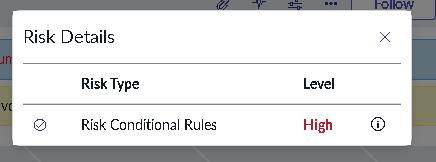
4.4 — Risk Result Proven on the Change Form

This step confirms that risk calculation rules produce visible, reliable outcomes. The risk field updates directly on the change record, supporting consistent approval decisions and review behavior.

  • Verified risk impact updates dynamically as change attributes evolve
  • Confirmed governance logic is clearly observable on the record
  • Improved reviewer speed and consistency during approval
Change record showing updated risk

Change record showing the risk field updating automatically as conditions change.

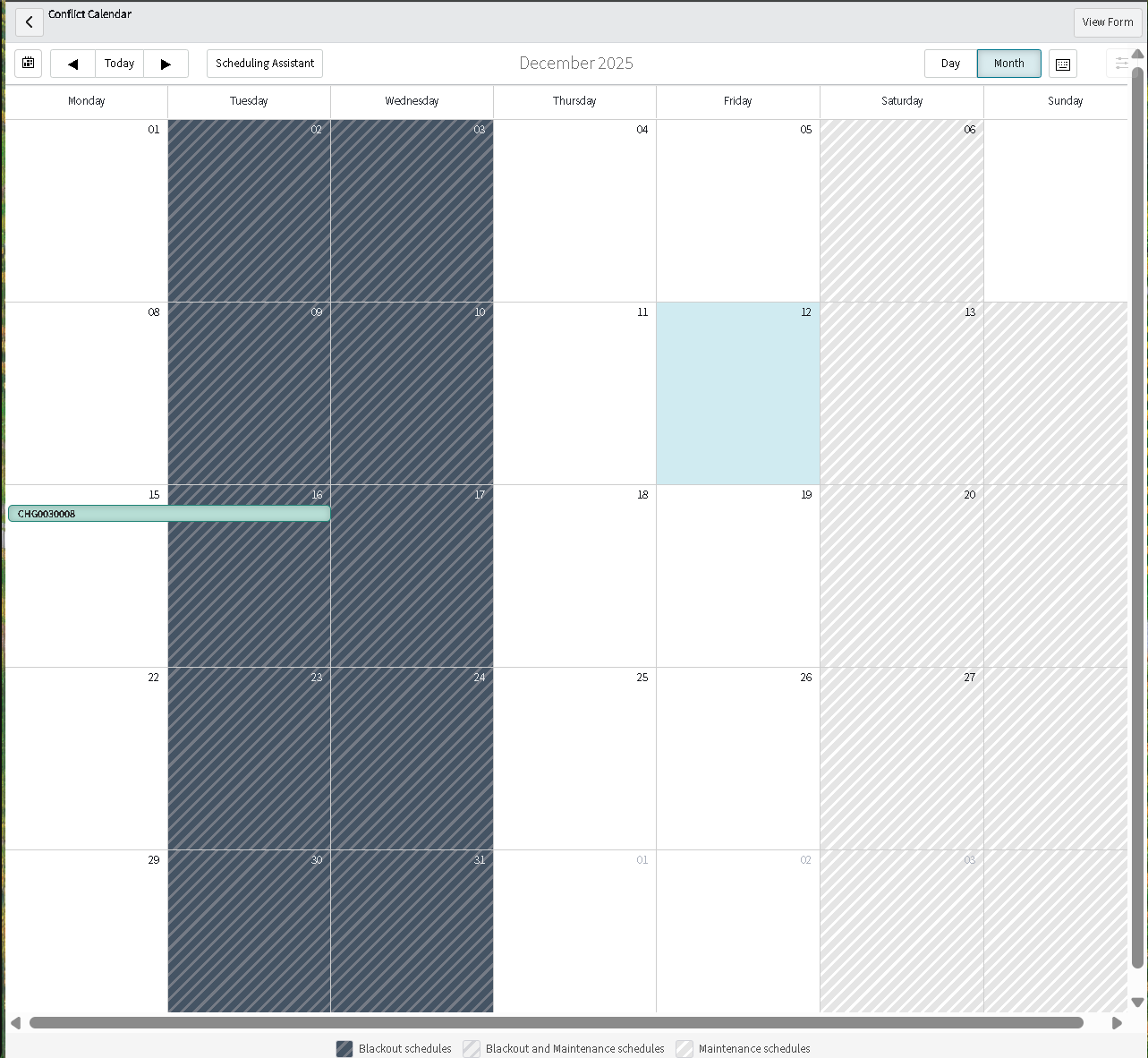
4.5 — Conflict Calendar Supports Proactive Scheduling Decisions

A conflict calendar view was used to surface scheduling conflicts before changes are executed. This reduces collisions between high-impact activities and supports coordinated release planning.

  • Improved visibility into overlapping change schedules
  • Supported proactive mitigation instead of reactive outage response
  • Strengthened governance through visual planning and coordination
Change conflict calendar month view

Monthly conflict calendar view supporting proactive change scheduling decisions.

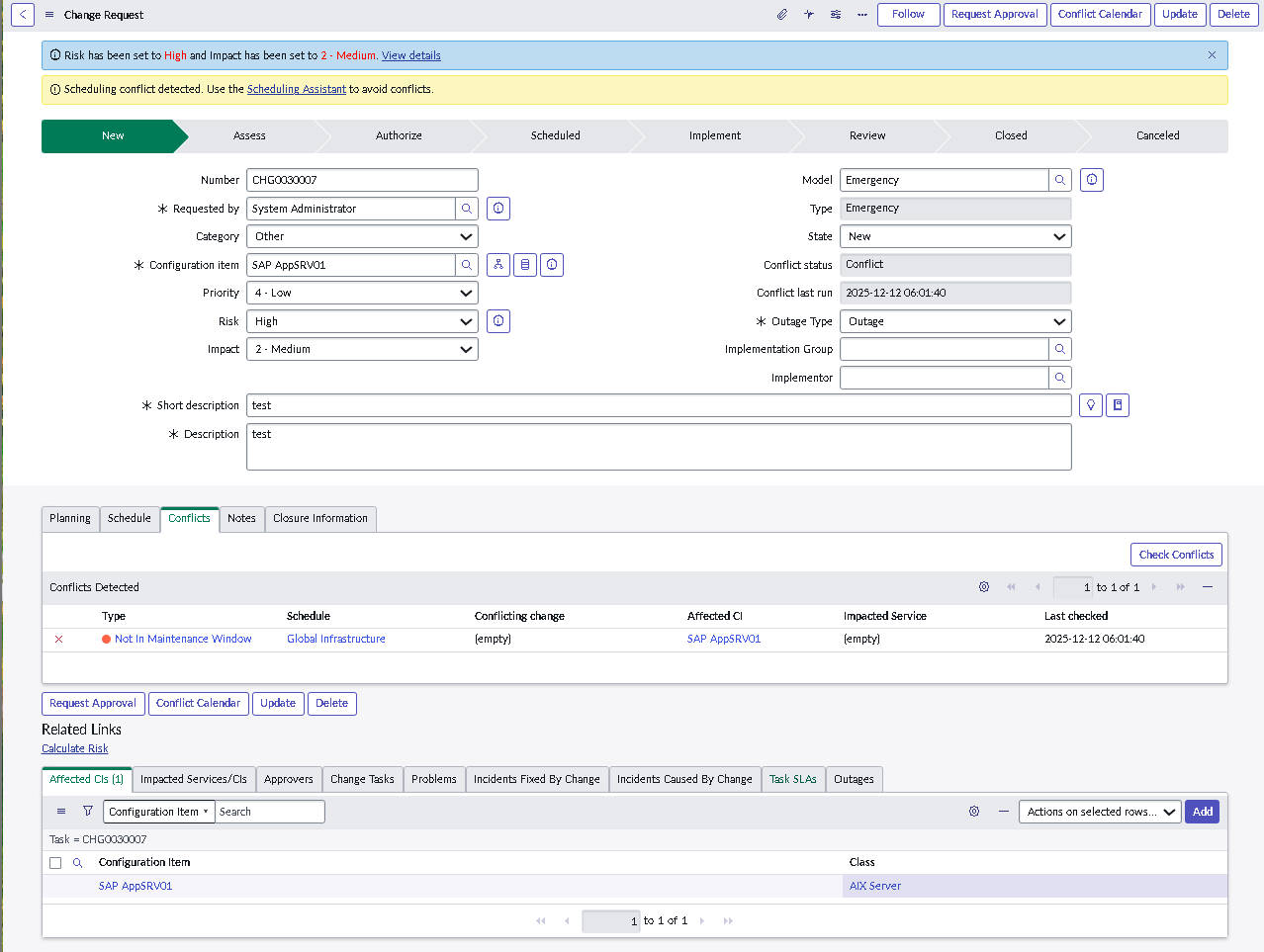
4.6 — Conflict Banner Provides Immediate User Feedback

When scheduling constraints are violated or conflicts are detected, users receive immediate feedback directly on the change record. This reduces failed submissions and reinforces governance through clear, actionable UI signals.

  • Validated conflict banners appear upon scheduling violations
  • Encouraged correction before approvals and execution
  • Improved user behavior through immediate, visible feedback
Conflict detected banner on change form

Conflict detected banner displayed on the change record when scheduling constraints fail.

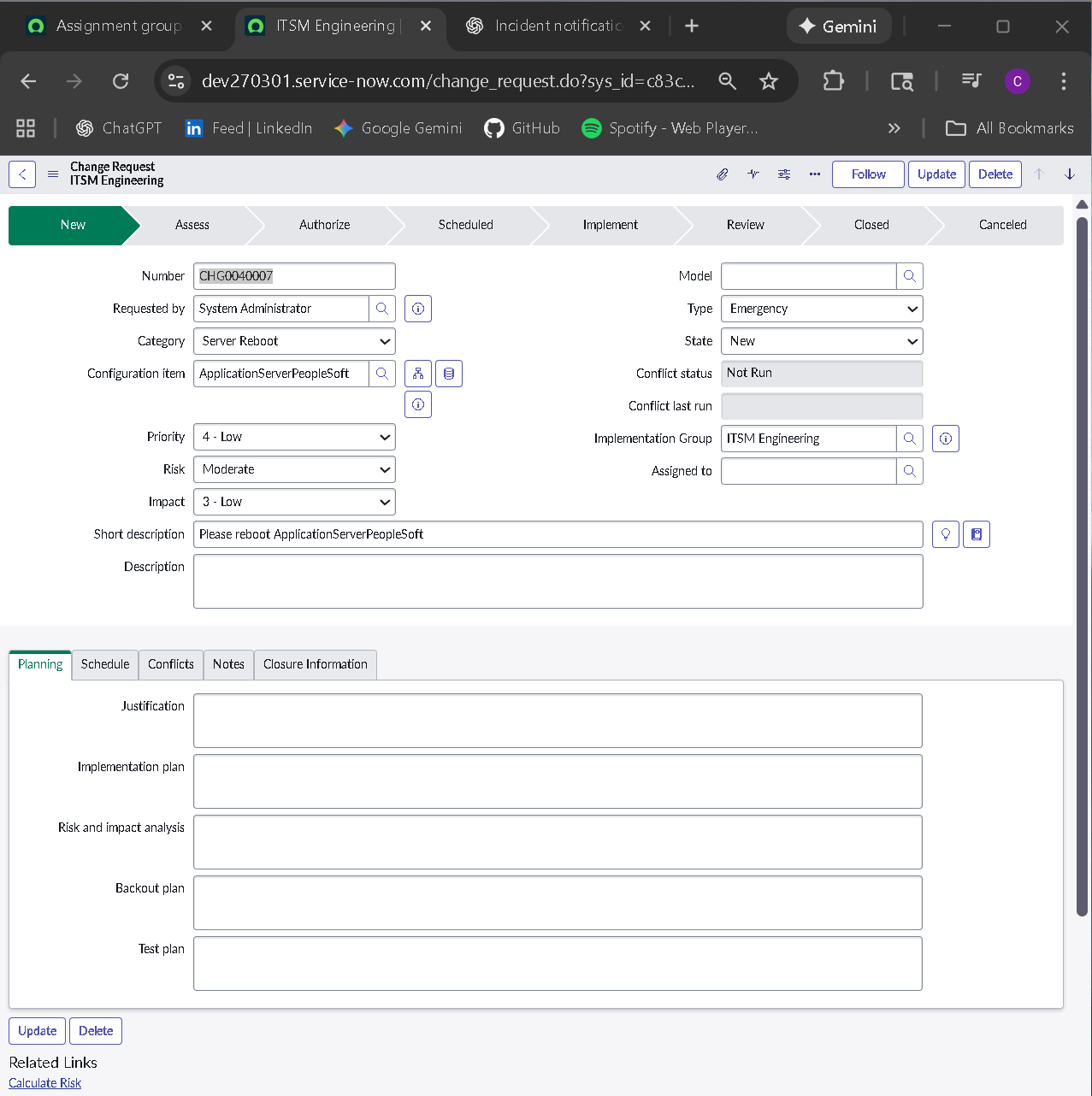
4.7 — Engineering Specific Form View Supports Different Change Audiences

Different change types and audiences require different layouts. A dedicated engineering view supports technical execution workflows while still preserving the governance fields required for approval, audit, and risk assessment.

  • Validated view selection aligns with the intended engineering workflow
  • Improved usability while maintaining required governance controls
  • Reduced confusion between standard and engineering change records
Engineering change form view

Engineering change view showing a tailored layout for that change type.

Phase 5 — Emergency Change Control and Priority Gating

This phase enforces strict control over emergency change usage. Emergency workflows are restricted so they are only available when operational impact truly justifies bypassing standard change governance, preventing misuse as a convenience shortcut.

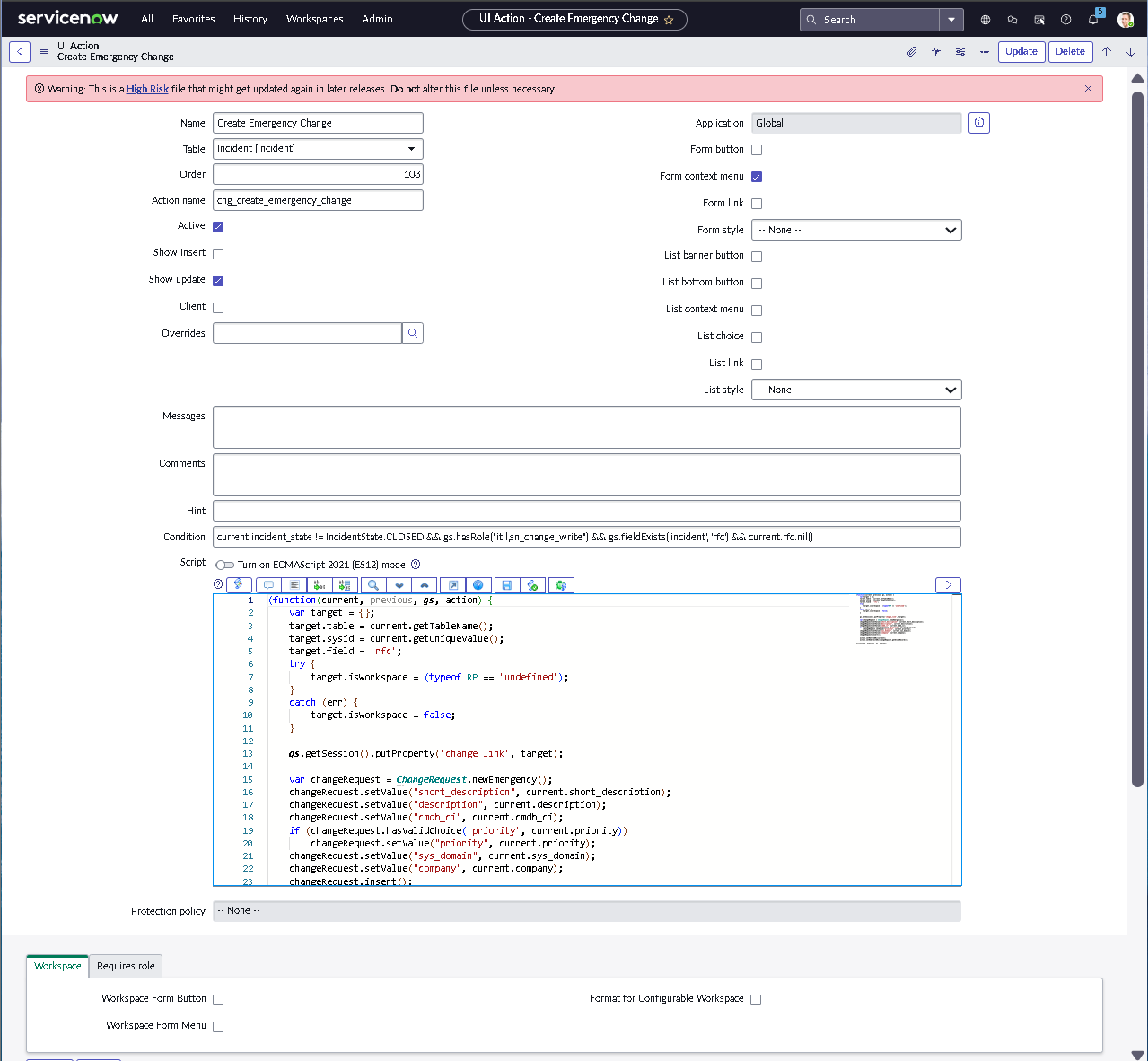
5.1 — Controlled UI Action for Emergency Change Creation

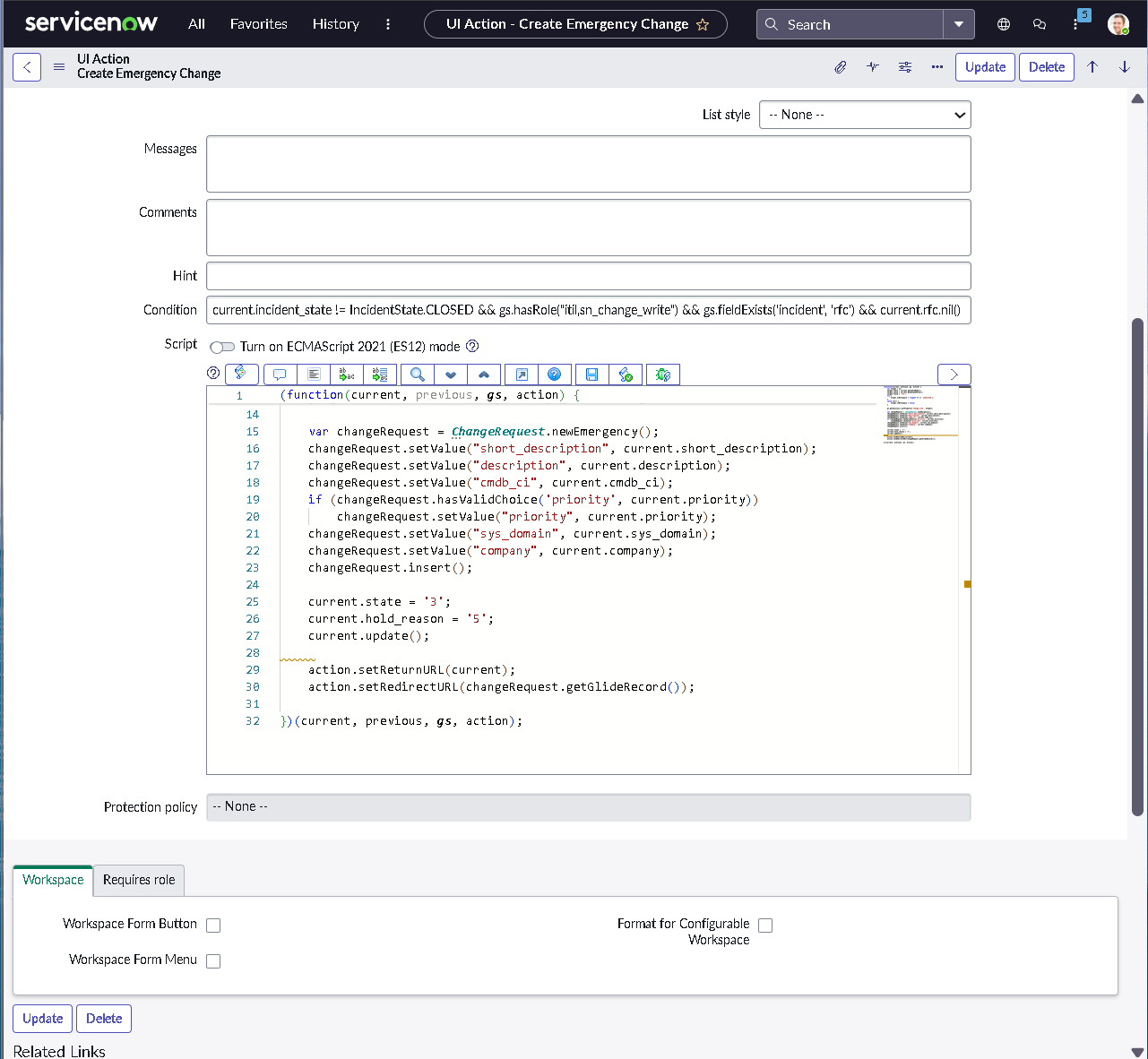
Emergency change creation was implemented as a controlled UI action rather than an always-available option. The action only appears when record context meets predefined criteria, ensuring emergency changes are created intentionally and remain auditable.

  • Implemented a guided UI action for emergency change creation
  • Restricted visibility to eligible incident and problem record contexts
  • Ensured emergency changes inherit source record context automatically
  • Validated UI behavior across multiple qualifying scenarios
Create emergency change UI action configuration

UI action configuration for creating an emergency change from a qualifying record.

5.2 — Priority and Record Type Gating (P1 / P2 Only)

Emergency change availability was further restricted by both priority and record type. Only high-impact incidents are eligible to trigger emergency workflows, ensuring emergency processes remain reserved for critical service restoration scenarios.

  • Limited emergency change creation to P1 and P2 incidents
  • Restricted UI action visibility by record type to prevent misuse
  • Validated gating logic across classic and modern UI experiences
  • Tested multiple priority scenarios to confirm enforcement
UI action script logic for priority gating

Script logic enforcing emergency change visibility only for high-priority incident contexts.

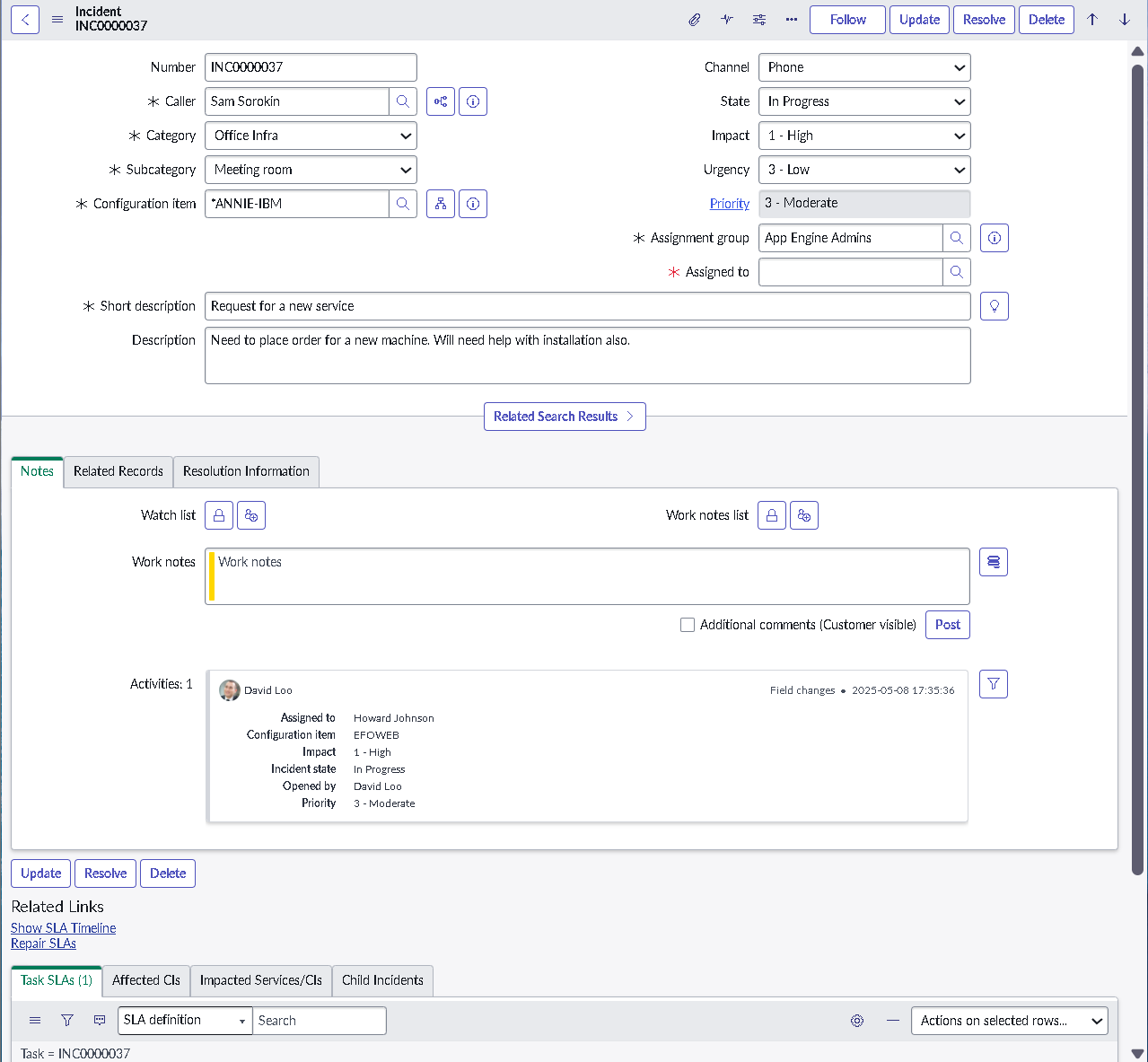
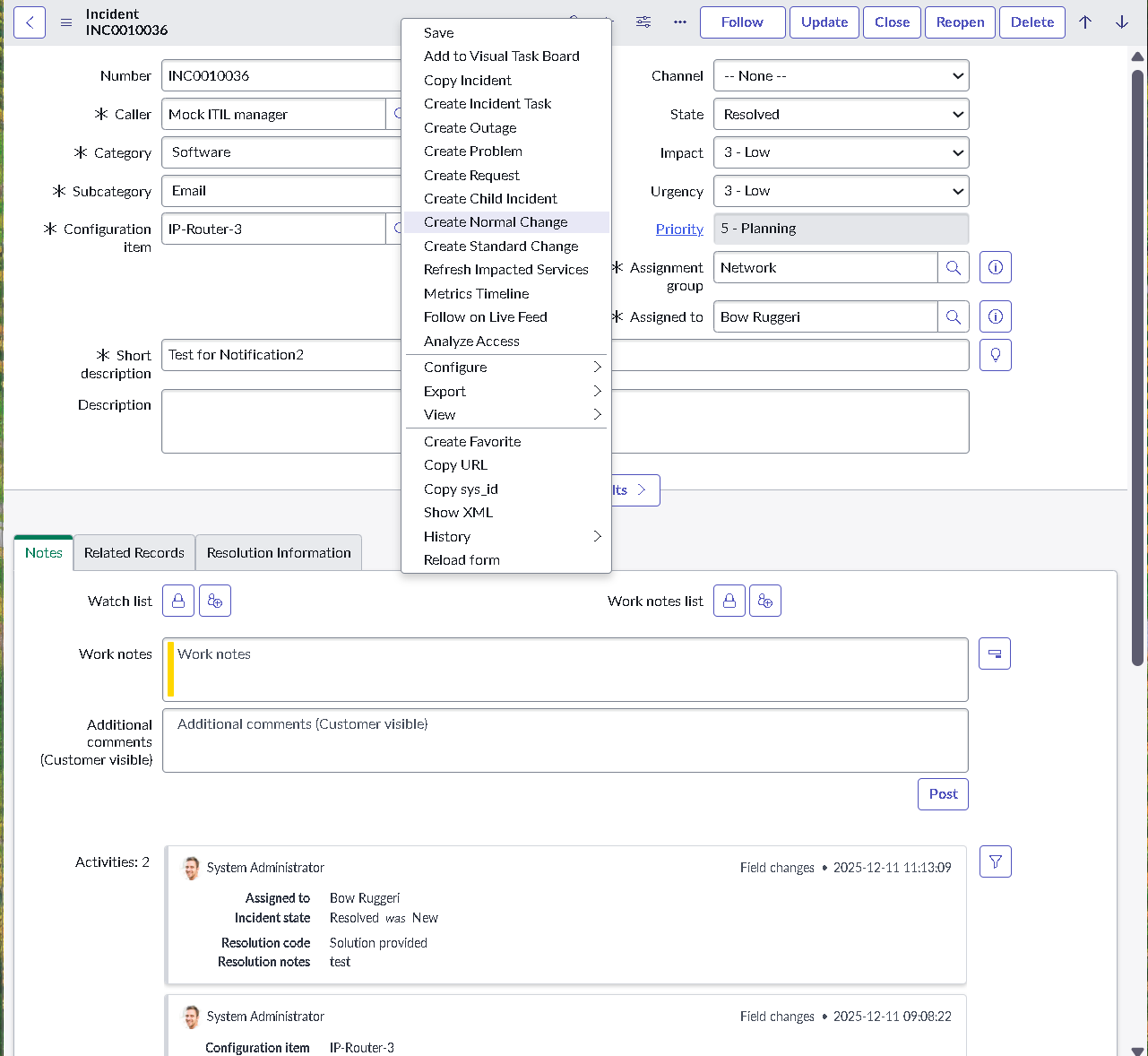
5.3 — Context Menu Integration Improves Analyst Workflow Speed

Emergency change creation was also integrated into the incident context menu. This supports rapid execution during true severity events while maintaining the same gating, validation, and audit controls enforced elsewhere.

  • Added a secondary access point without weakening governance controls
  • Improved analyst efficiency during critical response workflows
  • Kept behavior fully consistent with priority and record gating rules
Incident context menu emergency change action

Context menu option for emergency change creation directly within the incident UI.

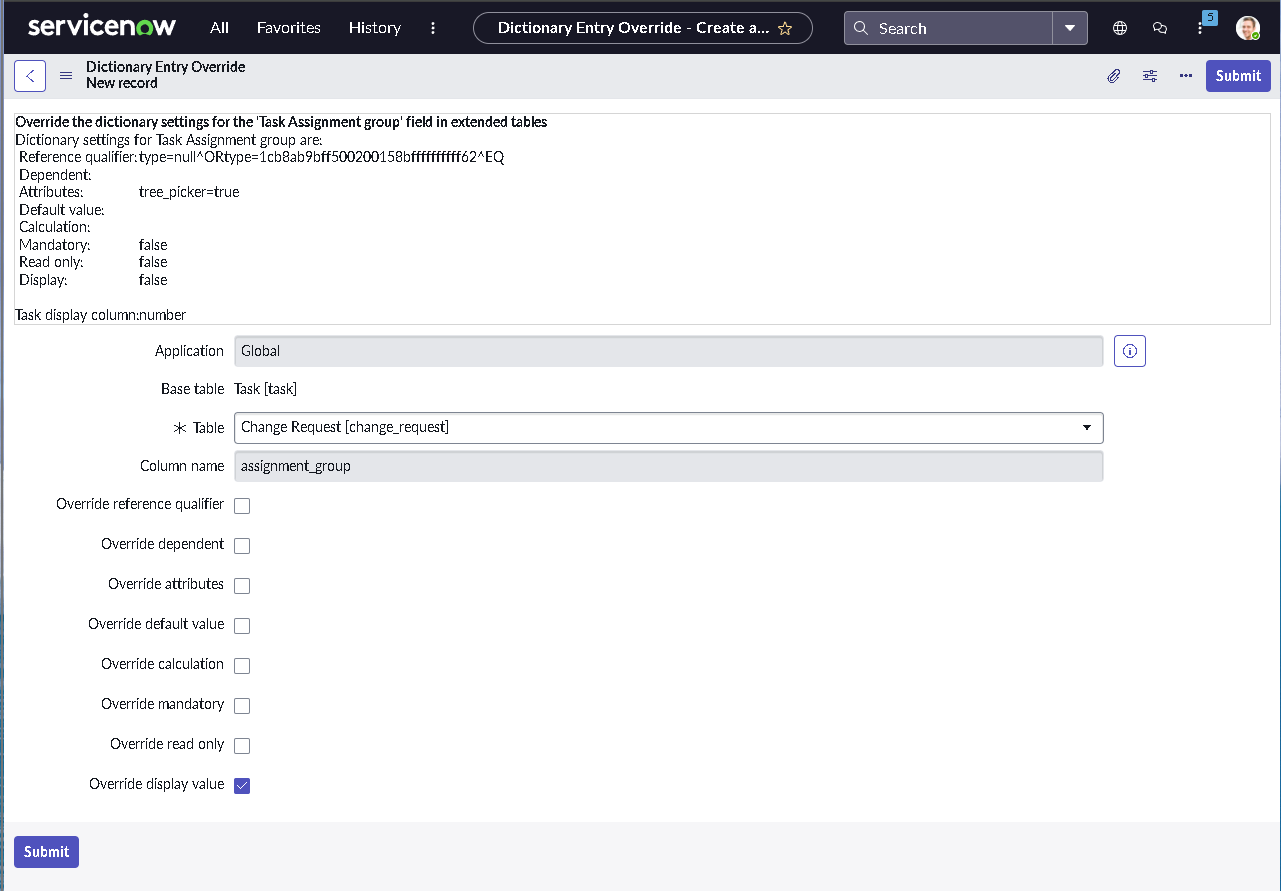
5.4 — Dictionary Override Enables Table Specific Behavior Changes

Dictionary Overrides were used to adjust field behavior only within the change request context. This platform-level approach allows precise governance control without introducing unintended side effects across unrelated tables.

  • Modified field behavior without impacting unrelated tables
  • Improved governance consistency for emergency change records
  • Demonstrated advanced platform configuration discipline
Dictionary override on change request table

Dictionary override showing table-specific adjustment for change request field behavior.

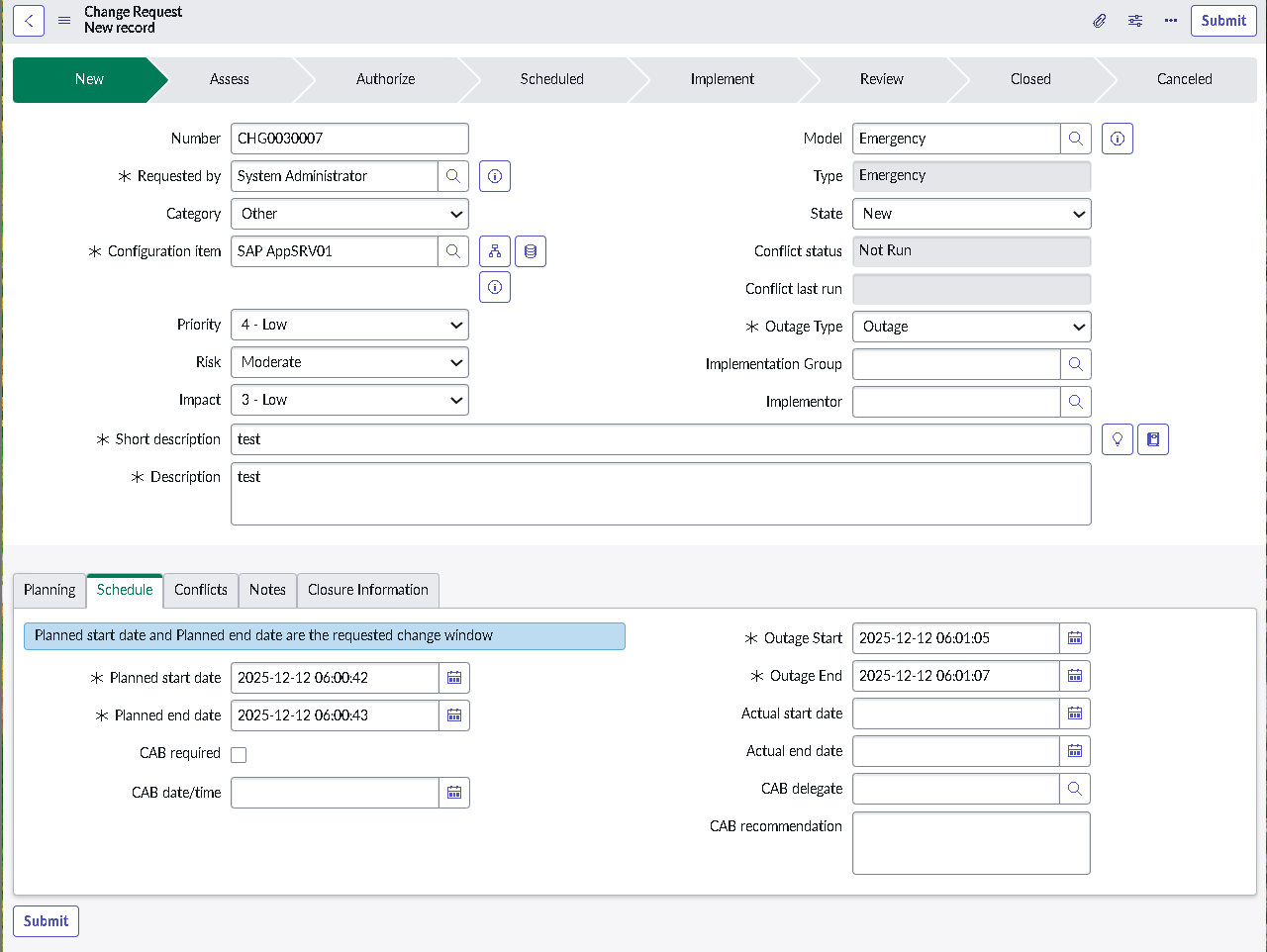
5.5 — Emergency Change Record Created Successfully with Correct Type

This final step validates that the complete emergency change flow functions as designed. The Emergency Change record is created with the correct type and reflects the intended governance, controls, and traceability.

  • Confirmed the record is created with the Emergency change type set correctly
  • Validated clear evidence of end-to-end implementation success
  • Ensured the record supports audit requirements and full traceability
Emergency change record created

Final Emergency Change record confirming correct type and successful workflow execution.

Implementation and Governance Strategy

This implementation treats ServiceNow as a control system rather than a ticketing tool. Each tier builds enforcement progressively, from clean intake to production safety.

Tier 1: Foundation & Integrity

Clean intake and lifecycle enforcement

  • Structured Categories Defined taxonomies prevent classification ambiguity
  • Triage-Focused Forms Above-the-fold design for analyst efficiency
  • State Transitions Locked lifecycle paths and closure rules

Tier 2: Process Automation

Logic-driven routing and behavior

  • Assignment Rules Deterministic routing via category and CI context
  • UI Policies Conditional field behavior without custom code
  • Notifications & SLAs Ownership-driven alerts and time tracking

Tier 3: Governance & Control

Production safety and risk enforcement

  • Risk Approvals Dynamic risk scoring drives approval gating
  • Emergency Restrictions P1/P2 priority gating prevents workflow abuse
  • Scheduling Controls Maintenance windows and blackout enforcement

Key insights

  • Out-of-the-box ServiceNow functionality requires refinement to support real enterprise governance.
  • Strong intake design and classification directly determine the effectiveness of automation downstream.
  • Emergency workflows must be tightly gated or they quickly become a process loophole.
  • Risk logic and scheduling controls are critical for protecting production stability.
  • Problem Management only adds value when ownership and investigation discipline are enforced.

Skills demonstrated

ServiceNow Administration Incident Management Problem Management Change Management ITIL Governance UI Policies & Dictionary Controls Assignment Rules Risk-Based Change Control Operational Process Design Audit Readiness

Summary

This ServiceNow ITSM Implementation Lab demonstrates an end-to-end configuration of enterprise-grade Incident, Problem, and Change Management workflows. The lab emphasizes governance, accountability, and operational safety over superficial configuration. By enforcing structured intake, deterministic routing, risk-driven change control, and tightly gated emergency workflows, the implementation mirrors real-world ITSM maturity and shows how ServiceNow functions as a control system rather than just a ticketing tool.